Tag: Feasibility Report

A Feasibility Report is a document that evaluates the practicality, viability, and potential success of a proposed project or solution. It analyzes various aspects—such as technical, economic, legal, operational, and schedule feasibility—to determine whether the project should proceed

  • How to Systematize and Automate Business with Notion: Best Practices for Collaborative Workflow Automation

    How to Systematize and Automate Business with Notion: Best Practices for Collaborative Workflow Automation

    In this article, we explore best practices for workflow automation to support collaborative work, using a real-world example. This example is part of an engineering company’s business case on how to systematize and automate the entire business. Automating a single business process is one thing—automating the entire business through a network of interconnected workflows is quite another. In our business process model, the entire company is structured into 16 high-level business process groups. Full automation means that each of these groups includes 4 to 12 workflows, working together to achieve a fully automated business system. To make this possible and efficient, we must rely on a structured, systematic approach to workflow automation and choose appropriate technique sand best practices.

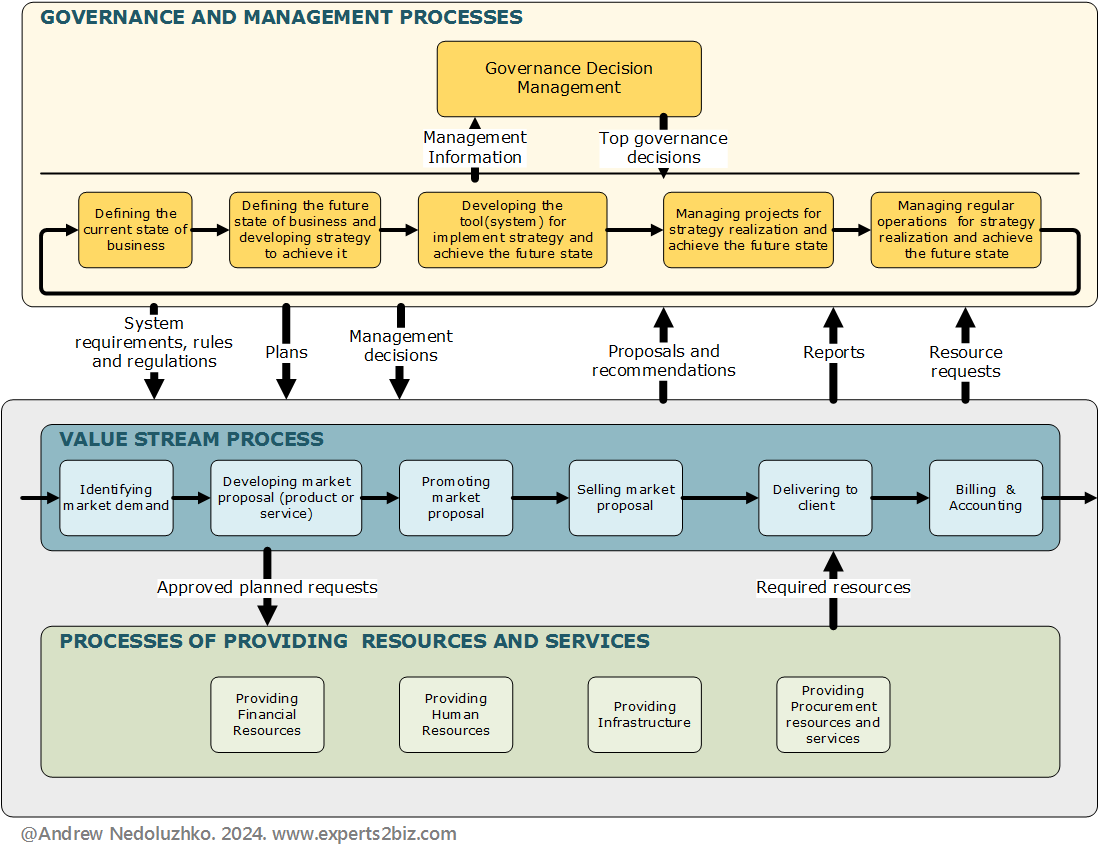
    Figure 1 – High level process model of the entire business example

    Now, we have three main approaches to automating workflows in Notion:

    • Using Notion’s native built-in automation features – such as database automations, buttons, templates, and reminders.
    • Integrating with external automation platforms – like Make.com, Zapier, or n8n, which allow for more complex logic and connections with other tools.
    • Combining both internal and external tools – to maximize efficiency and flexibility by leveraging the strengths of each approach.

    Of course native built-in automation suits better for automation of the collaborative workflows and using external automation platforms is much better for integration with others different systems tools and AI automation

    Workflow Automation Example

    In one of the previous articles, I presented the conceptual diagram of the process ‘Business System Analysis,’ and in this article, we turn that process into an automated collaborative workflow in a Notion workspace.
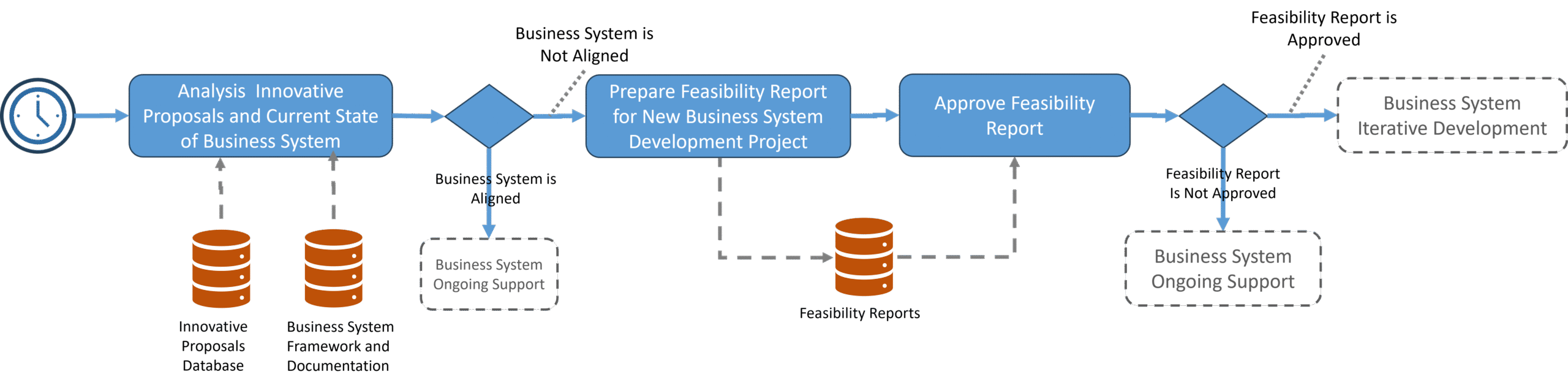
    Figure 2 – Conceptual diagram of Business System Analysis Process (Current State Analysis and Feasibility Report for Business System Development)

    To better prepare for automating this process, it’s good practice to design a more detailed workflow scenario and develop a more precise workflow diagram. This helps clarify requirements, refine the overall picture, and make the automation process easier.

    Scenario

    Precondition: The scheduled monthly review date for innovative proposals has arrived

    Flow:

    1. The workflow runs and generates a task for the business analyst: ‘Review Current Innovative Proposals and Make a Decision to Start Feasibility,’ with two possible outcomes — Start Feasibility Study or Cancel Feasibility Study. The ‘Start Feasibility Study’ decision continues the workflow, while the ‘Cancel Feasibility Study’ decision ends the workflow with a cancellation explanation added in the task notes.
    2. If the Business Analyst chooses the ‘Start Feasibility Study’ decision, the workflow generates a new task—’Prepare New Feasibility Report’—for the Business Analyst. To minimize manual work, the workflow also creates a new Feasibility Study document in the corresponding database table with the default status ‘In Preparation’ and opens it directly in the Notion window, allowing the analyst to begin working on the report immediately
    3. When the Feasibility Report is ready, the Business Analyst completes the task ‘Prepare New Feasibility Report’ by clicking the button ‘Feasibility Report Ready for Review.’ The workflow then generates a new task—’Review Feasibility Report’—assigned to the BA & Systematization Manager and updates the Feasibility Report’s status to ‘Under Review’.
    4. After reviewing the Feasibility Report, the BA & Systematization Manager makes a decision: either ‘Feasibility Report Ready for Approval’ or ‘Correction of Feasibility Report Required’:
      • If the decision is ‘Ready for Approval,’ the workflow generates a new task—’Approve Feasibility Report’—assigned to the CEO, and updates the Feasibility Report’s status to ‘Under Approval.’
      • If the decision is ‘Correction Required,’ the workflow generates a new task—’Correct Feasibility Report’—assigned to the Business Analyst, and updates the status to ‘Under Correction.’ Once the correction task is completed, the workflow returns to this review step and repeats the decision process.
    5. The CEO makes one of two decisions:
      • ‘Approve Feasibility Report’ – The workflow updates the Feasibility Report’s status to ‘Approved,’ sends notifications to the Business Analyst and the BA & Systematization Manager, and triggers the next workflow to create and track a new project based on the approved Feasibility Report.
      • ‘Reject Feasibility Report’ – The workflow updates the status to ‘Rejected,’ and sends notifications to the Business Analyst and the Manager. In this case, the Innovative Proposal on which the Feasibility Report was based may be revised and resubmitted the following month.

    Postconditions:

    • Option 1: The Feasibility Report is approved, and a new Project is created in the Project Register database.
    • Option 2: The Feasibility Report is rejected.
    • Option 3: The Feasibility Report is not initiated.

    This scenario helps us design a more detailed and precise workflow diagram for implementing this process in Notion.

    Figure 3 – Detailed BPMN-diagram of workflow (Current State Analysis and Feasibility Report for Business System Development)

    Sometimes, like many other No-Code/Low-Code tools, Notion doesn’t support fully customizable or sophisticated UI/UX solutions. However, there are always creative ways to work around these limitations — here are a few of mine.

    Workflow Tasks.

    User tasks are the core of any collaborative workflow. The analysis of the scenario reveals five key decision-making tasks:

    1. Review Current Innovative Proposals and Decide Whether to Start a Feasibility Study
    2. Prepare New Feasibility Report
    3. Review Feasibility Report
    4. Correct Feasibility Report
    5. Approve Feasibility Report

    My first best practice is using a separate task list for each workflow. This approach allows us to build a relation between Feasibility Reports and their specific task list, improving both usability and process management. As a result, there will be multiple task lists across the Notion workspace. Some might find this inconvenient, since users typically prefer to see all their tasks in one place. However, Notion provides an elegant solution: the “My Tasks” widget. It aggregates tasks assigned to a user from all task lists across the workspace into a single, personalized view on their home page—solving the problem of scattered task visibility.

    Since Feasibility Reports relate to project management, in this section we create a “Feasibility Report Workflow Tasks” database to manage the process of “Current State Analysis and Feasibility Report for Business System Development”.
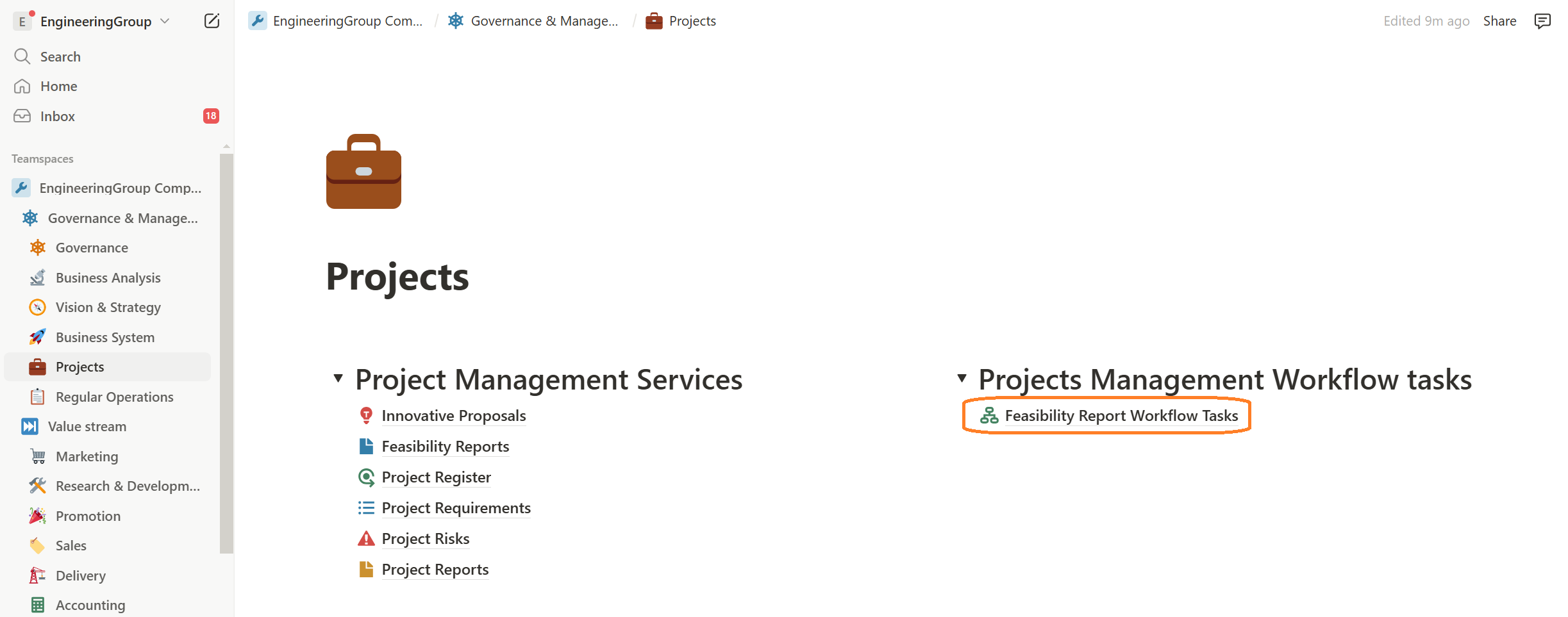
    Figure 4 – Feasibility Report Workflow Tasks in Projects Section

    Task Templates

    Each workflow task may some unique features and one my best practices to implement this is using the database item templates in task lists to create a template task form for each workflow task with some unique functionality. It gives us some opportunities because we can enhance UI / UX that restrict by standard Notion features and increase effect of using workflow by users. But ability to use templates in automation is currently available only for native automation not for internal platform like make.com, Zapier, n8n etc.

    Each workflow task may have unique features, and one of my best practices is to use database item templates in task lists to create a custom task form for each workflow step with specific functionality.

    This approach offers several benefits:

    • It allows us to enhance the UI/UX beyond standard Notion limitations
    • It increases the effectiveness and value of the workflow for users
    • It enables easy and fast adjustments to individual workflow tasks when needed

    However, please, note that template usage in automation is currently supported only in Notion’s native automation, and not in external platforms like Make.com, Zapier, or n8n.
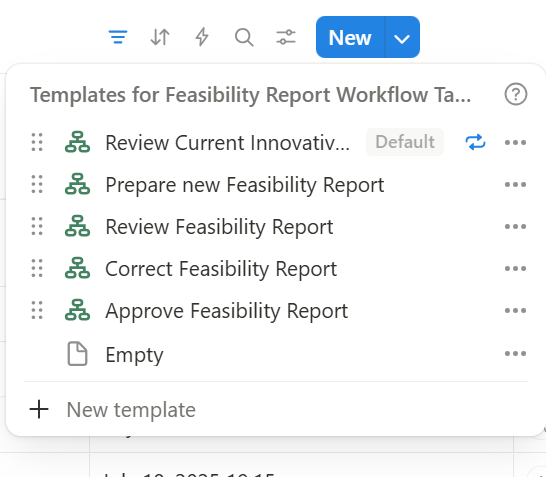

    Figure 5 – Tasks datatabase templates for workflow

    Setting Default Task Properties Using Templates

    We can configure specific properties within each task template. For example, a useful approach is to define which process actor should be assigned to each workflow task. If a process change requires updating the task performer, you can simply modify this property in the task template without altering the workflow logic.

    Setting Default Task Properties Using Templates

    We can configure specific properties within each task template. For example, a useful approach is to define which process actor should be assigned to each workflow task. If a process change requires updating the task performer, you can simply modify this property in the task template without altering the workflow logic
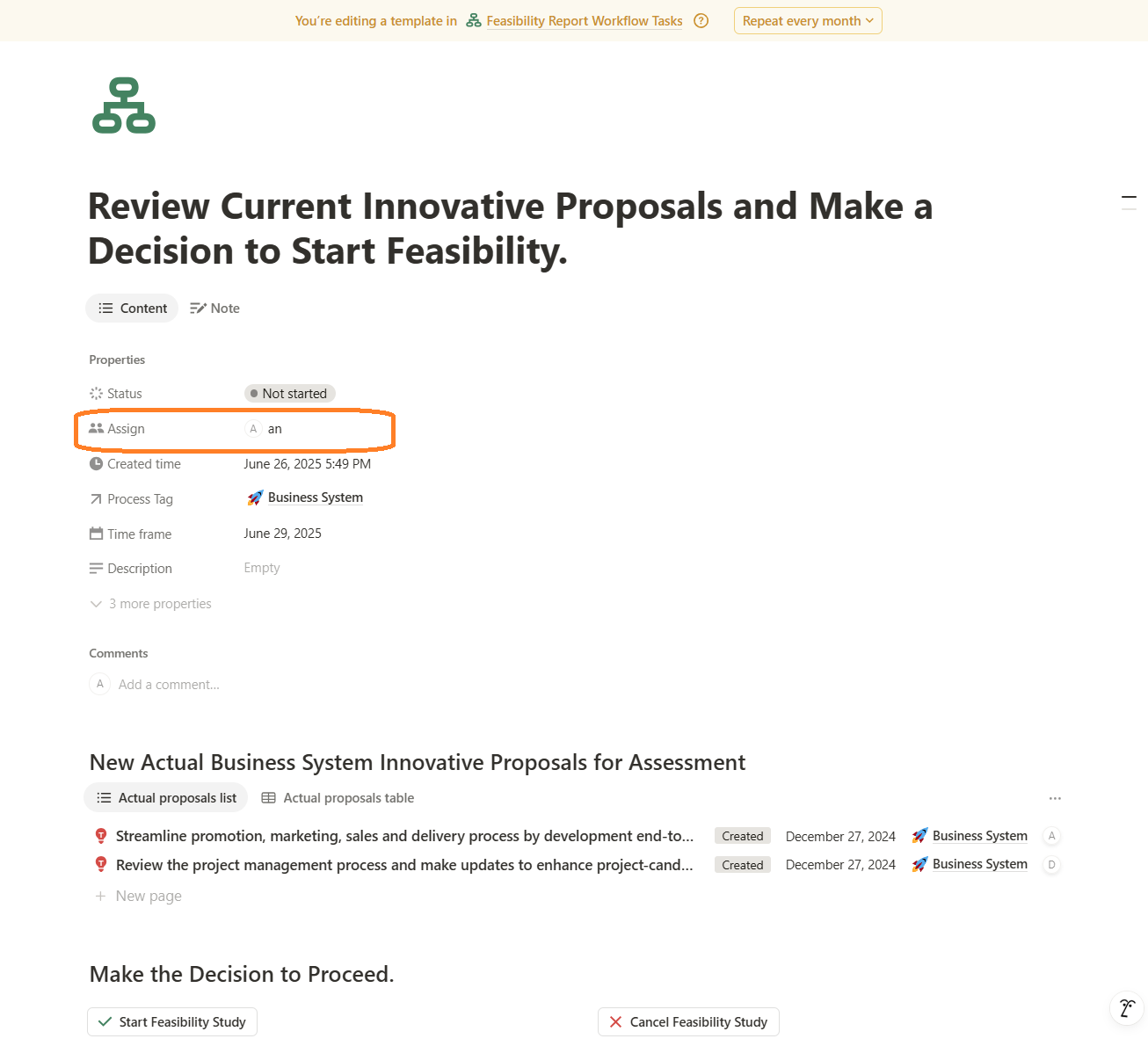
    Figure 6 – Setting Default Task Properties Using Templates Example

    Embedded Views from Other Notion Databases into Tasks to Provide Contextual Data

    Embedding views from other Notion databases into tasks to provide contextual data to user. For example, in the task ‘Review Current Innovative Proposals and Make a Decision to Start Feasibility’, we display the latest business system innovative proposals directly within the task. This is convenient because the user doesn’t need to navigate to the Innovative Proposals database or manually filter for new, relevant items — everything they need is immediately visible within the task. It’s a powerful feature I love to use.
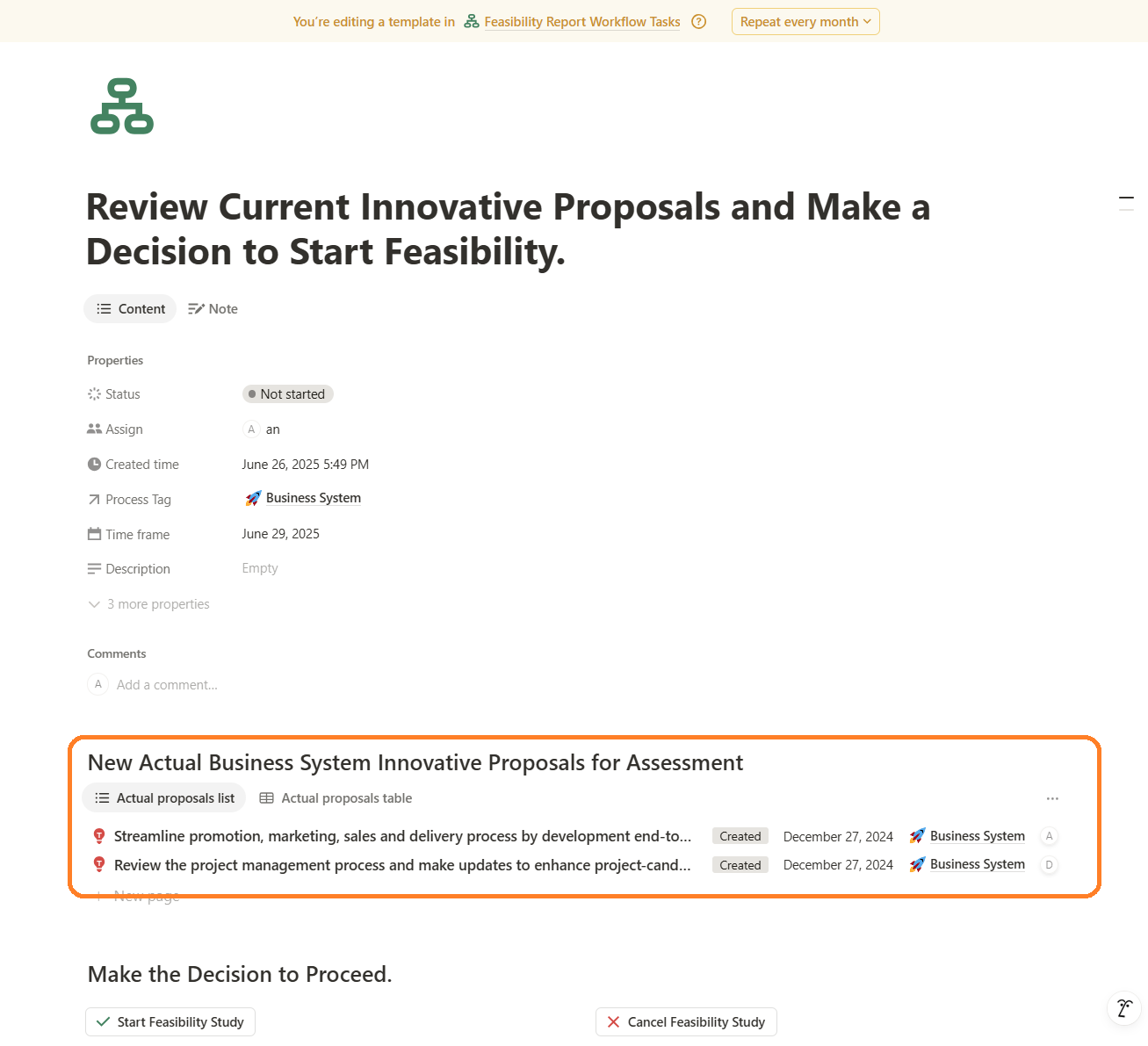
    Figure 7 – Embedded Views from Other Notion Databases Example

    Functional buttons in the task form

    Typically, the actions triggered by these buttons may include:

    • Confirming actions before automation begins — you can set up custom confirmation messages and buttons based on the specific workflow requirement.
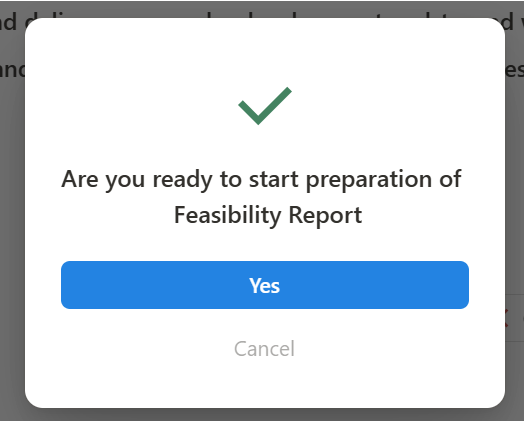
    Figure 8- Confirming Actions in Functional Buttons Example
    • Updating the current task by marking it as completed and recording the result with workfow actions — a valuable practice for tracking workflow progress.
    • Creating the next task or finalizing the workflow, depending on the scenario.
    • Automatic opening of item forms from related databases — another powerful feature is the ability to automatically open a related database item form directly within the current task, providing seamless context and interaction. For example, in the task ‘Review Current Innovative Proposals and Make a Decision to Start Feasibility,’ when the user selects the ‘Start Feasibility Study’ option, the workflow logic automatically generates and opens a new Feasibility Report form. This allows the user to begin developing the document immediately without manually navigating to the Feasibility Reports database or creating a new entry — it’s created and presented on screen instantly.
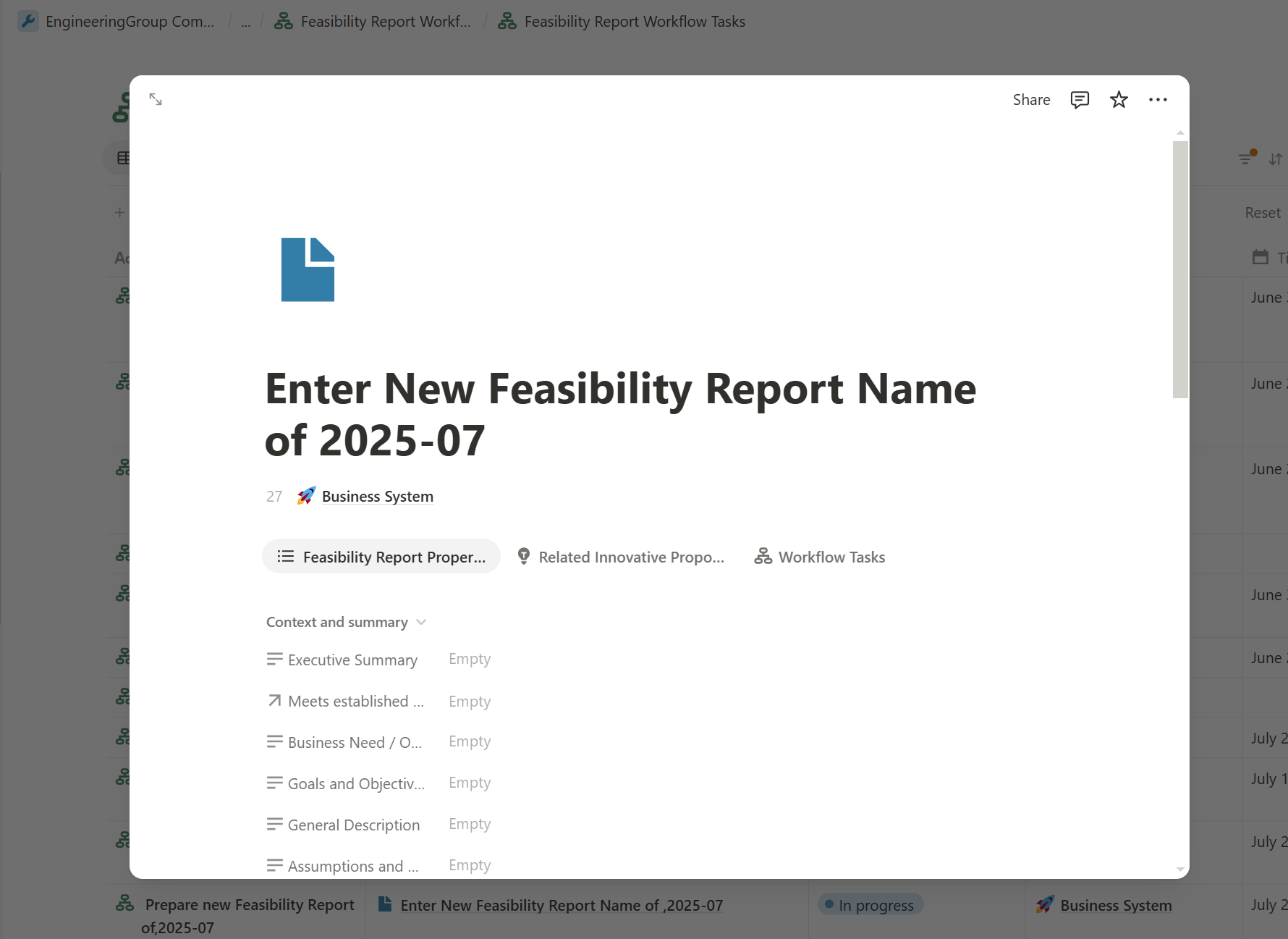
    Figure 9- New Feasibility Report Automatically Created and Opened Right in the Task Form

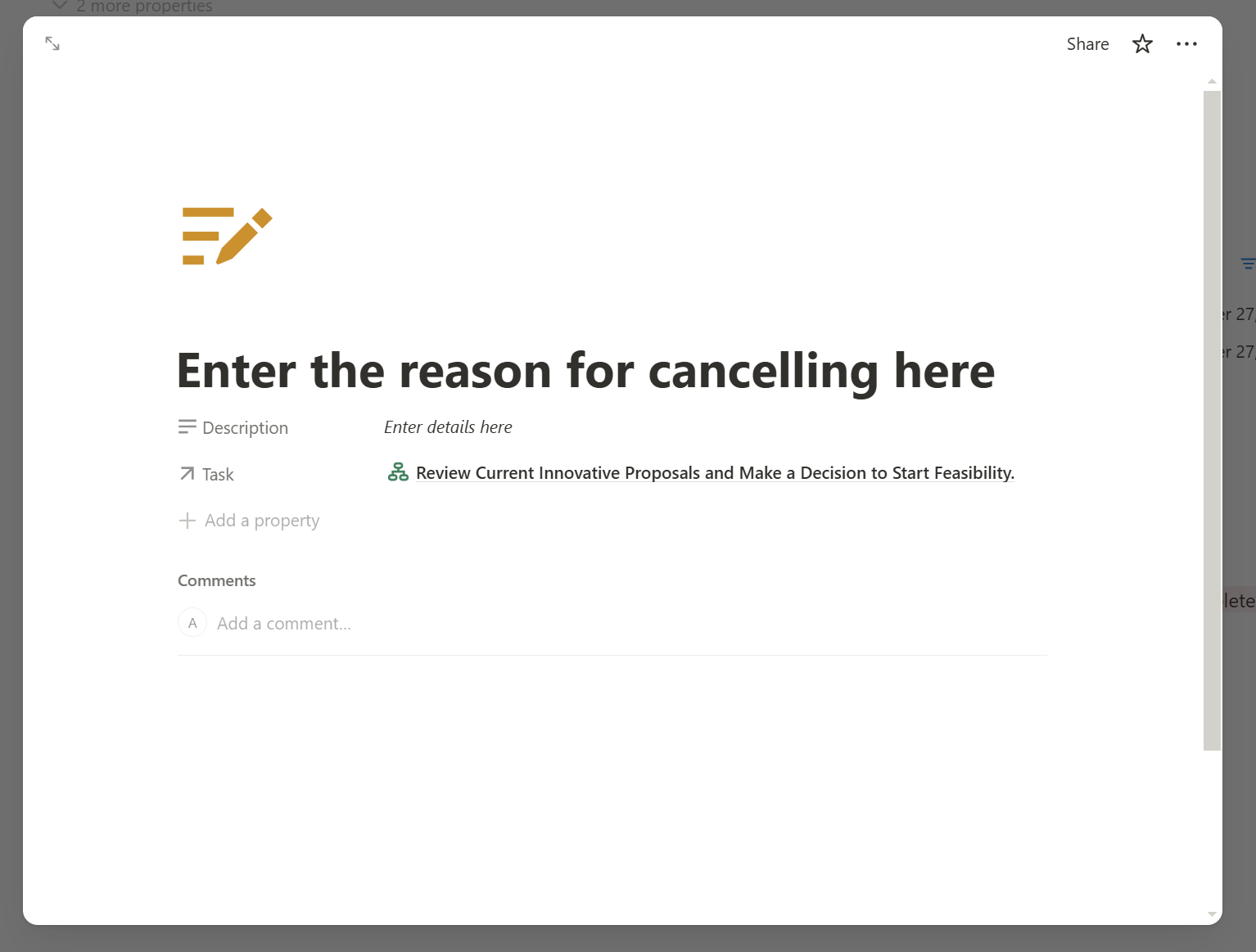
    If the user chooses the opposite decision — ‘Cancel Feasibility Study’ — the workflow logic automatically generates a notes form to capture the reason behind the cancellation

    Figure 10- New Task Note Report Automatically Created and Opened Right in the Task Form
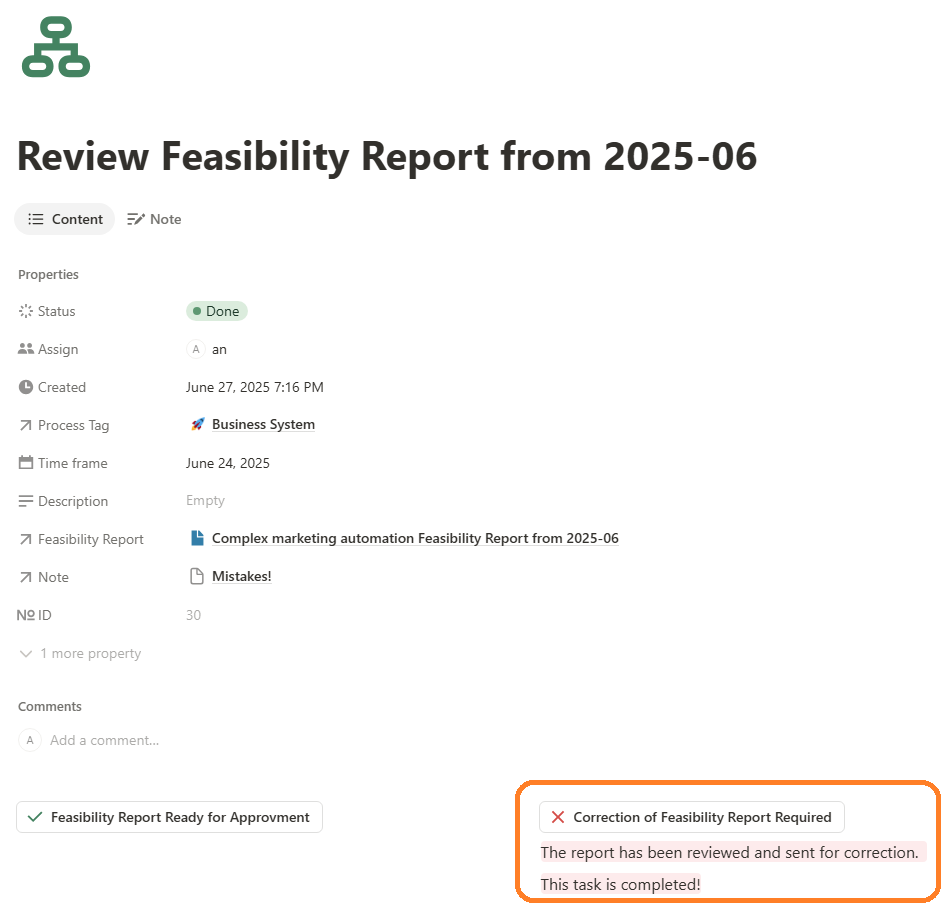
    • Final action. It would be ideal if buttons could be disabled after a task is completed to prevent users from accidentally triggering the workflow again. Unfortunately, Notion doesn’t offer this functionality yet. A practical workaround is to display a message beneath the clicked button, informing the user of the result and confirming the task’s completion:
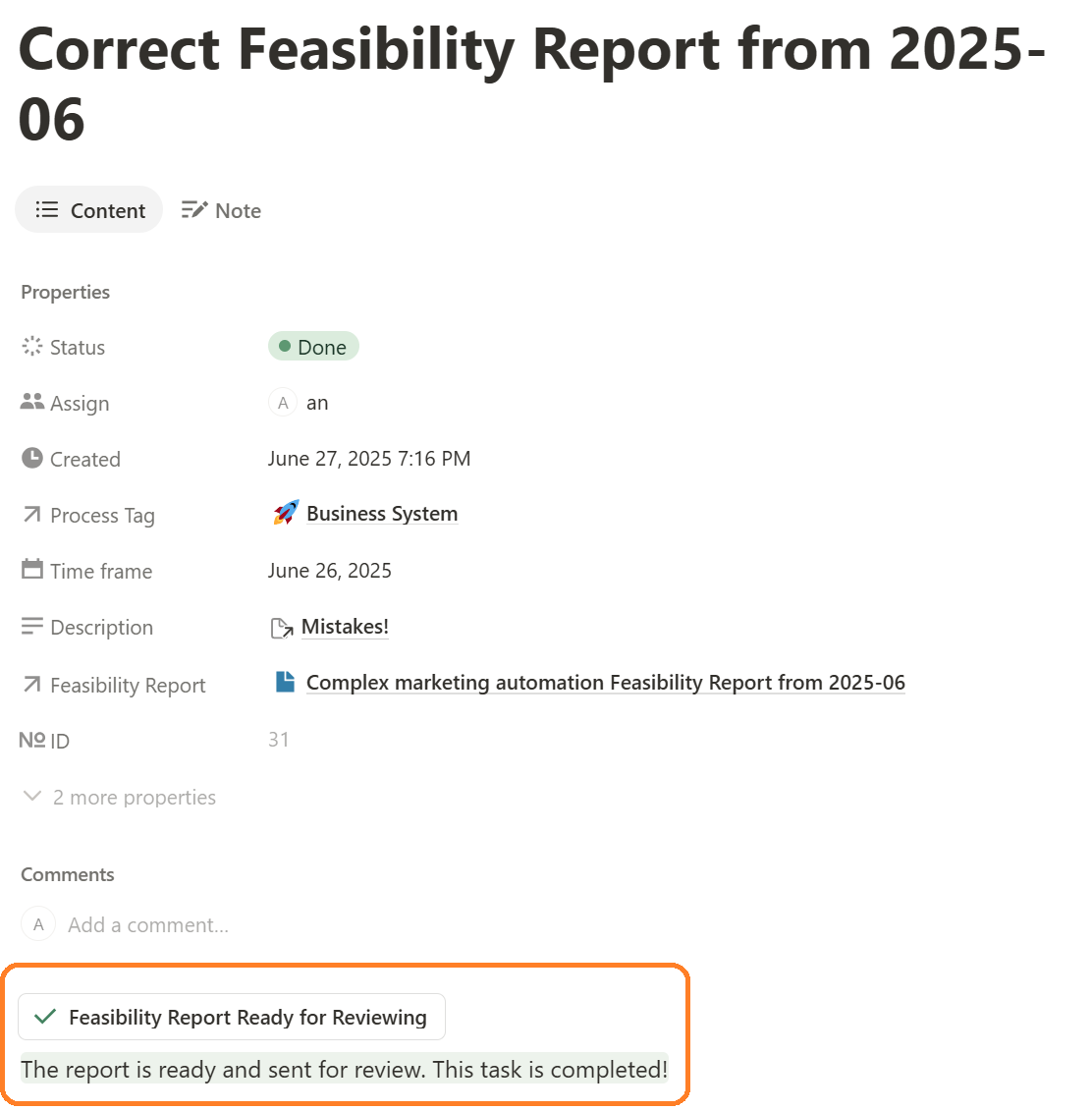
    Figure 11 – Displaying a Message Beneath the Clicked Button Example 1
    Figure 12 – Displaying a Message Beneath the Clicked Button Example 2

    Tracking workflow with the task view

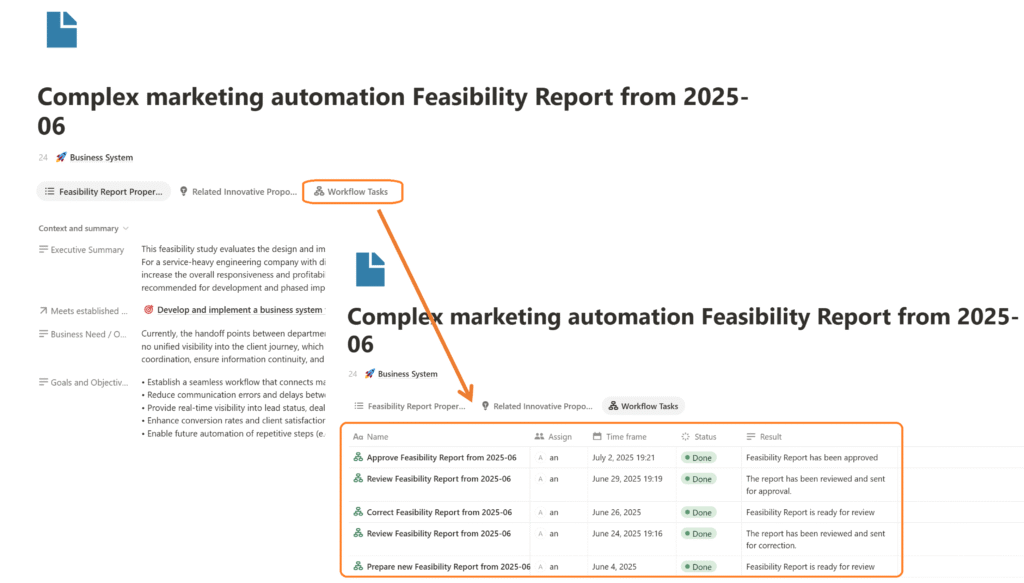
    Notion’s capabilities offer a straightforward approach to tracking workflows through relationships, views, and layout customization. This method enables you to see the full lifecycle of a database item or document as it moves through a specific workflow

    Figure 13 – Displaying a Lifecycle of Feasibility Report Document throw the task list view

    Managing the Status of a Processing Object Using a Make.com Scenario

    Another important feature that an automated workflow should include is automatic status updates for the processing object. In our case, the processing object is a Feasibility Report, which can have the following statuses: In Preparation, Under Review, Under Correction, Under Approval, Approved, and Rejected. Ideally, the status of the Feasibility Report should change automatically when a user completes a task and the configured Notion automations assign the next task or mark the workflow as complete. However, Notion automations do not allow this. This is where Make.com becomes very useful. We can easily create a Make.com scenario that monitors the results of workflow tasks and updates the Feasibility Report’s status accordingly.
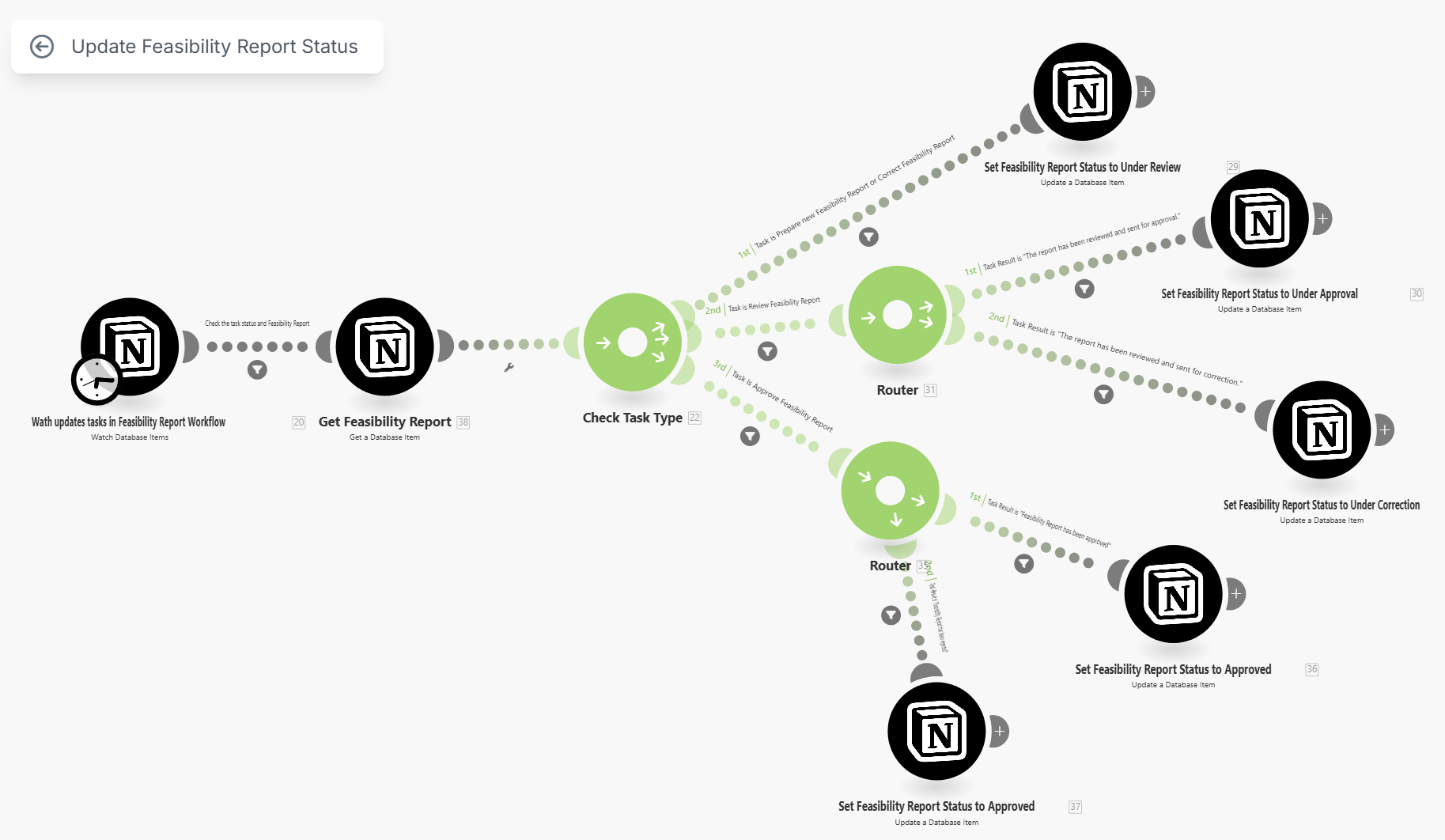
    Figure 14 – Make.com scenario to manage the status of Feasibility report throw the workflow execution.

    Summary and Conclusions

    Notion’s native automation features provide a fast and flexible way to develop collaborative workflows. To build effective and user-friendly workflow automation systems in Notion, the following best practices are recommended:

    1. Start with a detailed process description. Begin with a conceptual process diagram, then translate it into a workflow scenario, and finally into a BPMN-style workflow diagram. This structured approach improves clarity, aligns stakeholders, and lays the groundwork for successful automation.
    2. Use dedicated task databases. A good practice is to create a separate task database for each primary document or object being processed along a specific workflow. This is more effective than using a single general task list where tasks from multiple processes are mixed together. With the approach of dedicated task lists for each workflow, users can still conveniently see all their tasks from across the workspace using the “My Tasks” feature on the Notion home page. This method improves the efficiency of information delivery, enables tailored different views, enhances the overall user experience for various system stakeholders, and makes Notion workflow automation solutions more user-friendly.
    3. Customize tasks with templates. Use task templates to configure each workflow step with specific instructions, views, forms, and buttons. This allows each task type to follow its own logic and UI design.
    4. Embed contextual views into tasks. Insert inline views of related Notion databases (e.g. project details, documents, decisions) directly into task pages to give users the necessary context without switching views.
    5. Design functional buttons for each task type. Add dedicated buttons to each task template based on the business logic. This enables tasks to trigger actions like status changes, creating new records, or opening forms — all tailored to the current step in the workflow.
    6. Track workflow progress using task views. Use filtered and sorted task views to clearly show which tasks have been completed, are in progress, or are pending, and to monitor the full lifecycle of each database object as it moves through the workflow.
    7. Managing the Status of a Processing Object Using a Make.com Scenario. When Notion’s built-in automations fall short, you can leverage the capabilities of automation platforms like Make.com to solve these problems.

    Implementing collaborative workflow automation in Notion significantly reduces manual work, minimizes errors, accelerates task execution, and improves team coordination — all of which contribute to lower operating costs, increased revenue, and ultimately, higher business profitability. By applying these best practices, businesses can build solutions to automate collaborative workflows quickly, easily, and cost-effectively.

  • How to systematize and automate business with Notion. Step 3: Launch regular processes of ongoing business system development, maintenance and improvement

    How to systematize and automate business with Notion. Step 3: Launch regular processes of ongoing business system development, maintenance and improvement

    At this step, we will focus on explaining the mechanisms of the processes for building, developing, improving, and maintaining the business system.

    Implementing such a process mechanism addresses the core challenge of business systematization: before systematizing the business itself, it is necessary to first build and launch the systematization processes to reduce potential risks and achieve greater impact. It’s also impossible to create a perfect business system instantly. We can’t create it within a single project or even a series of projects. Because there are three main factors affected there:

    • The first factor is accepting reality — a realistic understanding of the current state of business systematization in relation to the desired outcome. That is, if you’ve attempted to complete Step 2, which is to develop a business system framework, you’ve probably already realized that even properly formalizing the structure of goals and processes is quite challenging. You’ll likely need to revisit, review, and adjust what has already been done from time to time. And sometimes, you may even need to pause the work to gather more information — for example, actual performance data to refine the goals, or feedback from process participants regarding how those processes are carried out.
    • The second factor is the external environment — everything happening around your business. Market changes, innovations, new methods, products and technologies, emerging markets, regulatory changes, and the appearance of new competitors will all require you to review and adjust your products, services, processes, goals, and strategies for achieving them. Accordingly, from time to time, it is necessary to make changes to the existing business system to ensure that the entire business aligns with market realities and remains profitable and competitive.
    • The third factor is the human factor. First, people within the business need to mature in order to embrace a systematic approach — and not everyone can do this quickly. It often takes several cycles or iterations before they begin to view the business as a system, think systematically, make decisions systematically, and act accordingly. Even more importantly, as new elements and functions of the business system are implemented, those involved in the business will begin to discover new opportunities for growth and generate fresh ideas for development. This will also lead to changes in the existing system, prompting further improvement and evolving of the business system.

    In other words, a recurring, cyclical (iterative) approach will be more effective than scattered, impulsive projects. Of course, there are businesses with extremely simple business models and technologies, or those operating in stable markets — and even there, such a cyclical approach can still be effective; the cycles of change and development in the business system will simply occur less frequently and at a smaller scale. However, for dynamic, growing businesses or those operating in highly competitive markets, one must be prepared for a large number of repeated business system development projects before reaching any level of stabilization.

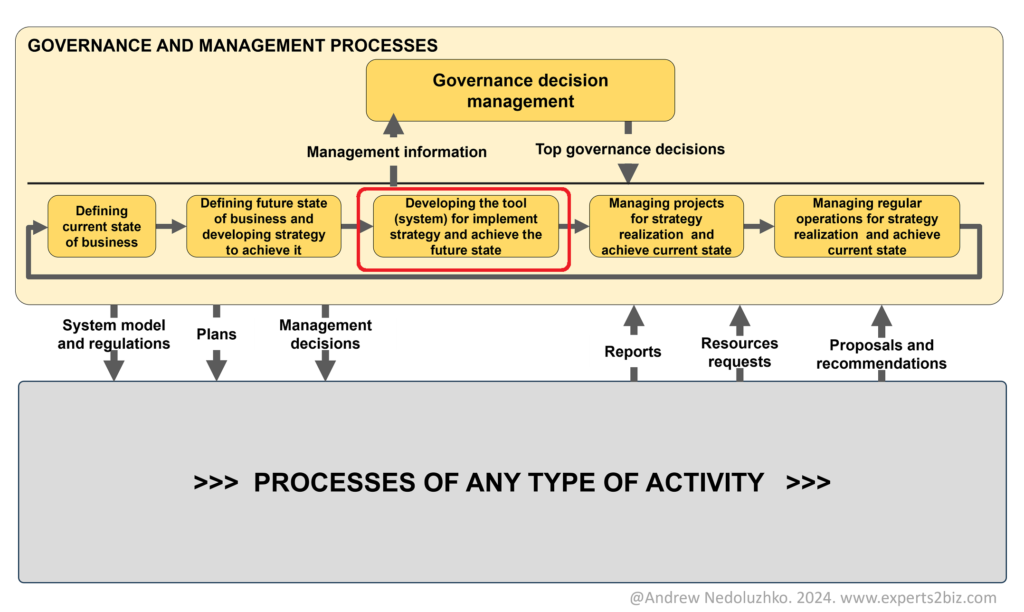
    Before we move on to designing this process and developing services in Notion to support and automate it, we need to pause and consider the context of the process — that is, to understand its inputs and outputs. In the article where I discussed the development of a high-level process model of the entire business, I presented the following conceptual diagram:

    In this diagram, the process “Developing the tool (business system) for implementing strategy and achieving the future state” represents the business system lifecycle process — or, for short, the Systematization Process.

    This diagram implies that the main input for the business systematization process is the outcome of the strategic management process: “Defining the current state of the business and developing the future state of the business.” These outcomes can be presented as innovative proposals for the development of the business system. In addition, such proposals can be created by managers or owners of various processes. Innovative proposals may also be formed within the systematization process itself, during the execution of operations supporting the current version of the business system. An innovative proposal is essentially an idea aimed at improving existing business processes. Small companies and solopreneurs may use the term ‘ideas’ for simplicity and convenience, while still understanding the purpose of these ideas.

    The output of the process is the business system framework in the form of Notion databases containing elements of the business system, the development of which was presented in the previous article, along with supporting documentation in the form of various regulations, procedures, or instructions. This documentation elaborates on the framework and can be stored directly in the corresponding database records. For example, we can store instructions in the description of a particular process, or a brief draft of a roadmap in the record of a specific goal, and so on. The structure and documentation of the business system are also used to ensure the correct execution and automation of all business and control processes—so we can make sure that all our processes are properly configured and functioning, and that any nonconformities identified are either resolved immediately or formalized as innovative proposals to be implemented in future iterations of business system development.

    The Business Systematization Life Cycle Process

    Now let’s examine the internal structure of the process “Developing the tool (business system) for implementing strategy and achieving the future state.” When we look at this process as the life cycle of a business system, we can distinguish four categories of activities or tasks that must be performed to achieve optimal results. This approach allows for a more structured and effective design of the business process. These categories include:

    • Analytical tasks. These are discrete tasks that need to be performed periodically to assess whether the current state of the business system meets present needs. If it does not, we must prepare and approve a rationale for initiating changes, which serves as the basis for launching a change project and reserving and allocating the necessary resources for its implementation.
    • Project tasks. Once a project is initiated, we must clarify the requirements, carry out the design of the changes, implement those changes, and finally integrate them into the business operations.
    • Regular operations. This involves maintaining the current state of the system, which includes identifying and resolving nonconformities and deviations, making minor updates to the framework and documentation of the business system, or preparing innovative proposals for further development.
    • Management tasks. We must manage each type of activity (analytical, project-based, operational), meaning we need to plan, monitor execution, measure, and analyze the outcomes.

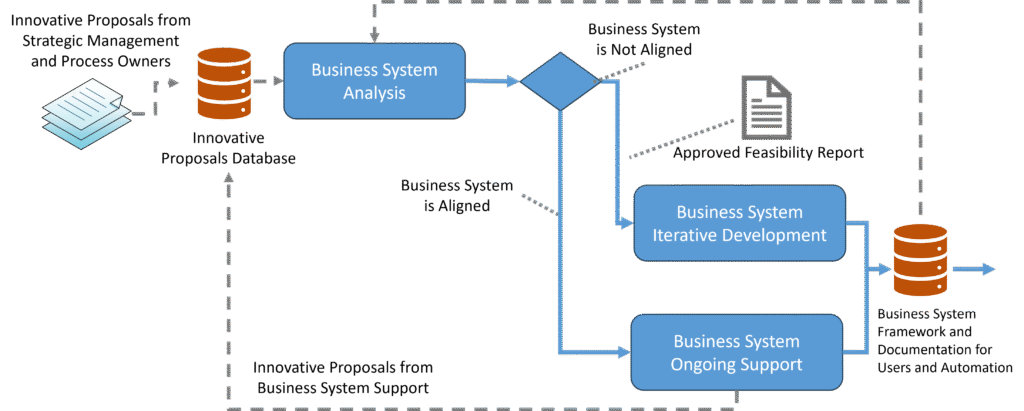
    Accordingly, we arrive at the following model of the business systematization lifecycle process.

    This process includes three sub processes: Analysis, Development, and Support of the Business System. The words ‘Iterative’ and ‘Ongoing’ are not necessary – I added them to emphasize this aspect. Now, let’s take a closer look at each of them.

    The Business System Analysis Subprocess

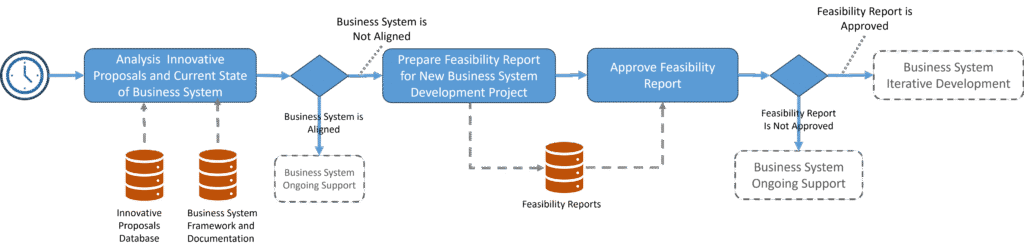
    This process have the next logic:

    1. Innovative proposals are collected in a database table and, at a set interval—monthly, quarterly, or semi-annually—these proposals are reviewed. It is possible that there are no proposals at all, or too few and too minor to justify a system-development project. In that case, we simply continue supporting the current version of the business system.
    2. If, however, there are enough innovative proposals, the next step is to prepare a Feasibility Report to justify launching a new business-system development project. Once the report is drafted, it goes through an approval process:
      • If the Feasibility Report is approved, the business-system development project is initiated.
      • If the Feasibility Report is not approved, we continue to support the existing system until the next scheduled review of innovative proposals against the current state of the business system.

    The Business System Development Subprocess

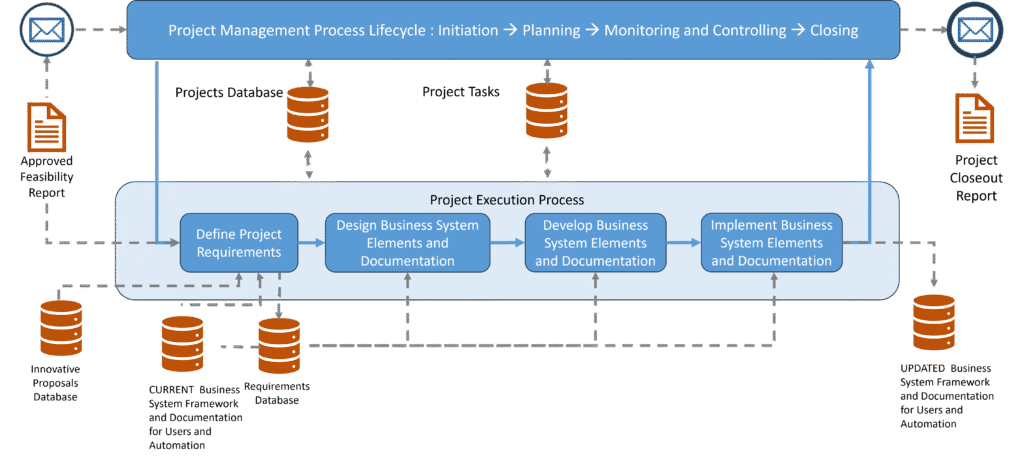
    The logic of this process is as follows. It consists of two subprocesses:

    1. Project Management Process, which includes the classic project management processes: Initiation, Planning, Monitoring and Control, and Project Closure.
    2. Project Execution Process: which involves the sequential steps of Defining Requirements, Designing Business System Elements and the structure of necessary documents, Developing Business System Elements and documents, and Implementation.

    The Business System Support Subprocess

    As in the previous case, the word ‘Ongoing’ is not necessary. I added it to emphasize this aspect as well.

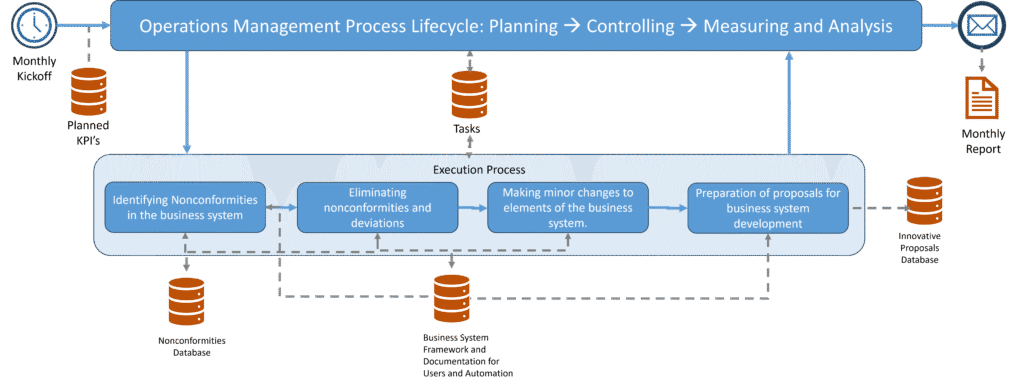
    The Business System Support process also consists of two sub processes:

    1. Support Operations Management Process, which includes Planning, Control, Measurement, and Analysis.
    2. Support Operations Execution Process, which includes the following execution steps:
      1. Identifying Nonconformities and Deviations in the Business System,
      2. Eliminating Nonconformities and Deviations in the Business System,
      3. Making Minor Changes to Business System Elements and Documentation,
      4. Preparing Proposals for the Development of the Business System.

    It is important to understand that at the start of the systematization activities, innovative proposals will mainly be formed based on strategic goals, which will indicate which projects we need to implement in order to achieve the desired business system. The frequency of such projects will be high at first; then, a stabilization period will follow, during which the frequency of such projects will decrease, and innovative proposals will mainly be generated by process owners or managers, as well as by the business system support process.

    Realization in Notion.

    The systematization life cycle diagrams clearly show which Notion database tables must be created next to launch the building, improvement, and support of the business system.

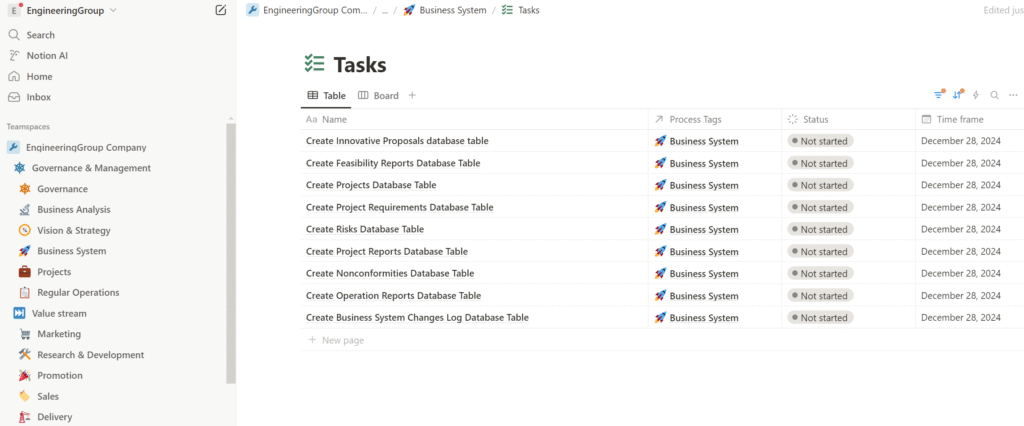
    So, we should add next portion of tasks in the Tasks database table with “Business System” tag and start executing them:

    1. Create Innovative Proposals database table;
    2. Create Feasibility Reports database table;
    3. Create Projects database table;
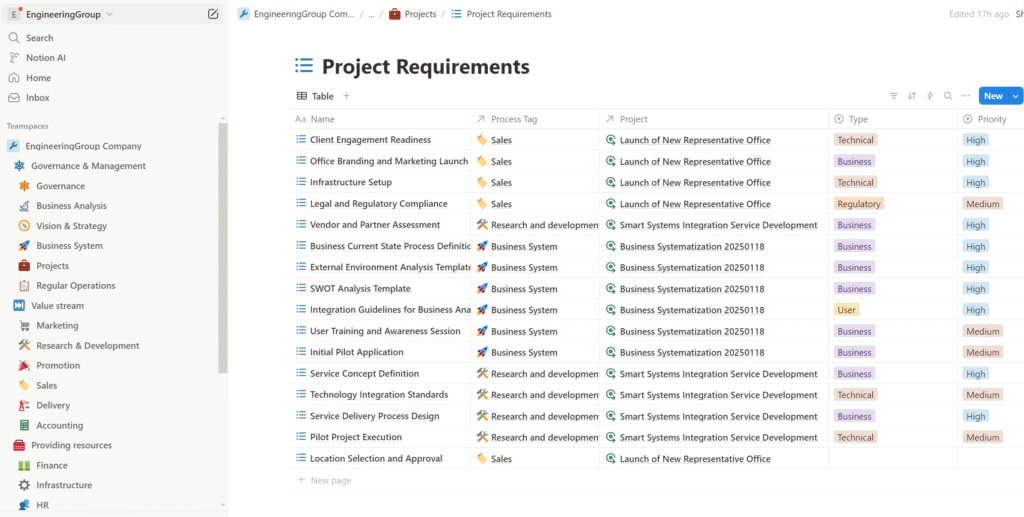
    4. Create Project Requirements database table
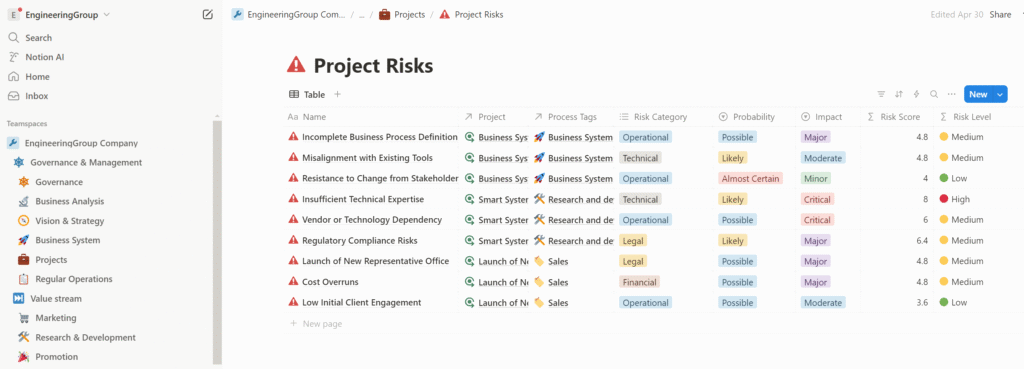
    5. Create Project Risks database table
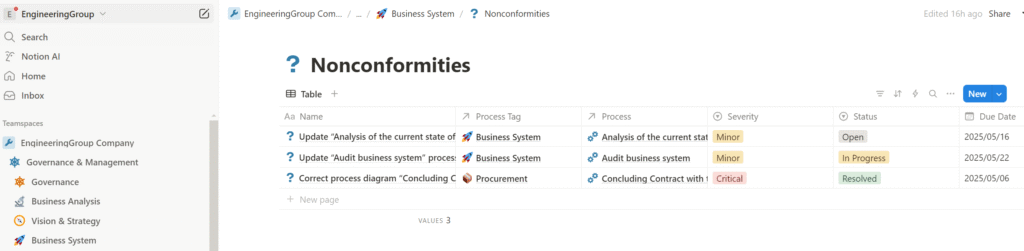
    6. Create Nonconformities database table
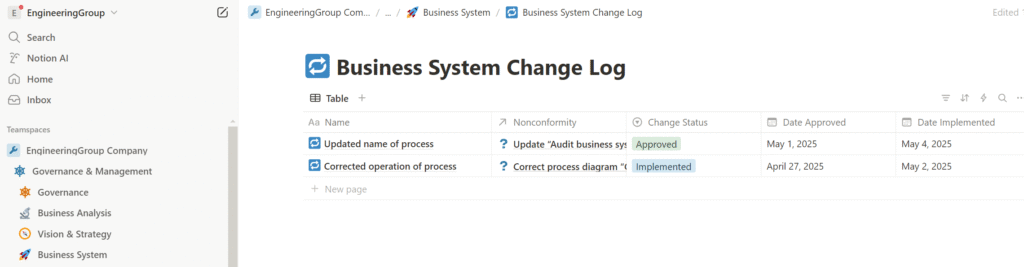
    7. Create Business System Changes Log database table
    8. Create Project Reports database table – optional table of project information to track project’s progress.
    9. Create Operation Reports database table – optional table to prepare and tracking operational reports.

    Benefits of Work Done

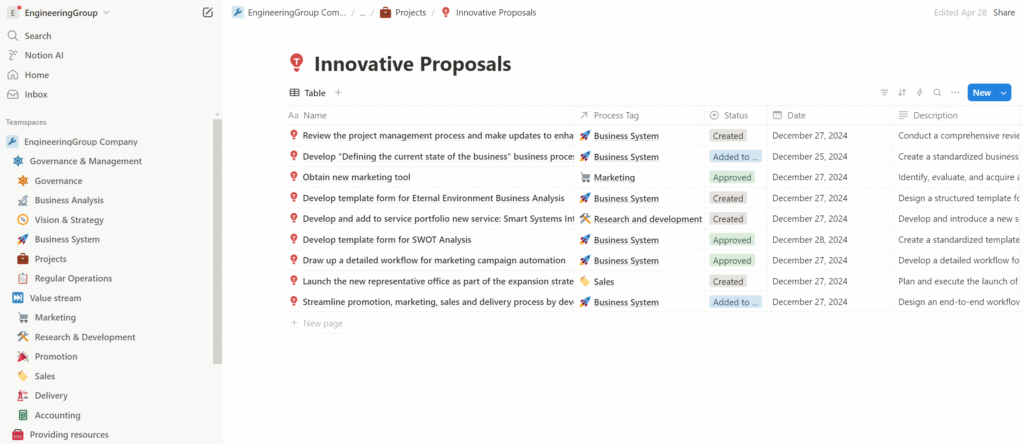
    Innovative Proposals Notion Database Table

    The ‘Innovative Proposals’ table is used to collect proposals on how to improve the existing business. Thanks to Process Tags, the ‘Innovative Proposals’ database becomes a universal tool that can be applied not only to systematization but to any aspect of the business — including new products, marketing tools, promotional campaigns, sales activities, and more.

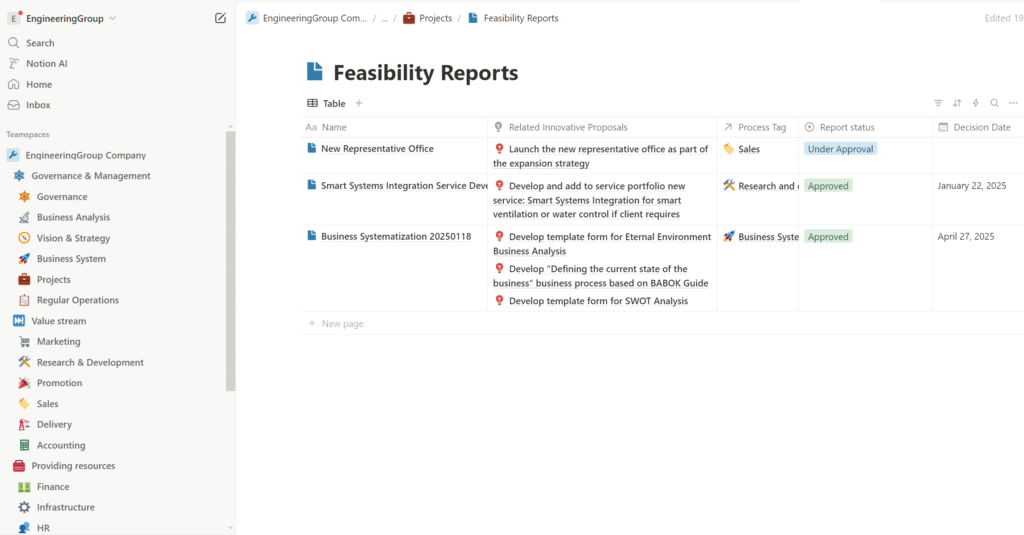
    Feasibility Report Notion Database Table

    The ‘Feasibility Reports’ table is used to group proposals and justify the feasibility of their implementation through development projects. It is linked to the ‘Process Tags’ table to identify the area of the future project, and to the ‘Goals’ table to clarify which previously established goals the project’s implementation is intended to support. Like the Innovative Proposals table, the Feasibility Reports table applies not only to the systematization of activities but also to the business as a whole.

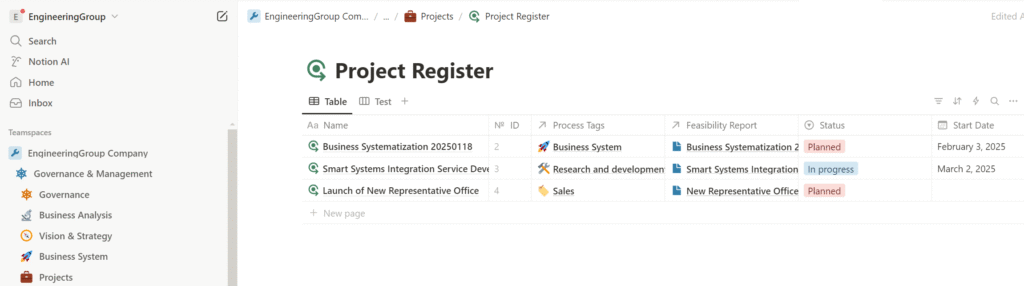
    Project Register Database Table

    The ‘Project Register’ table is used to manage all projects across the entire business and the data related to them. It links with Process Tags, Feasibility Reports, Goals, Project Requirements, Project Risks, and Project Reports to provide a comprehensive view of each project’s context, rationale, objectives, constraints, and outcomes.

    Project Requirements Database Table

    The ‘Project Requirements’ table is used to define, collect, refine, prioritize, and manage project requirements throughout the project lifecycle, ensuring alignment with stakeholder expectations and project objectives.

    Project Risks Database Table

    The ‘Project Risks’ table is used to manage all identified and documented risks by tracking their likelihood, impact, mitigation strategies, and status throughout the project lifecycle

    Nonconformities Database Table

    The Nonconformities Database Table is used to register, handle, and resolve identified nonconformities of the business system by documenting their nature, root causes, corrective actions, and resolution status to ensure compliance.

    Change Log Database Table

    The Change Log Database Table is used to register and analyze Business System changes, ensuring that all modifications are documented, evaluated for impact, and properly implemented to maintain system integrity and traceability.

    The Complete Set of Tools for Business Systematization

    Finally, a complete, ready-to-use set of tools supporting the business systematization process has been developed, ensuring continuous analysis, improvement, and development of the business system. It functions as a unified, cyclical mechanism that enables the business to evolve consistently, systematically, and cost-effectively, taking into account:

    • strategic vision and long-term goals,
    • initiatives from process participants,
    • changes in the external business environment.

    Project Management Tools

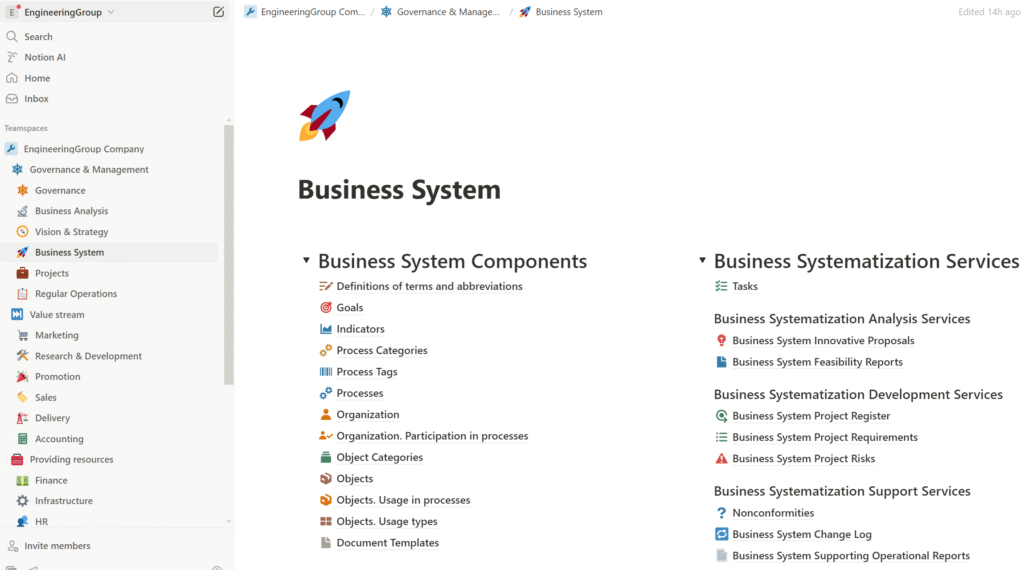
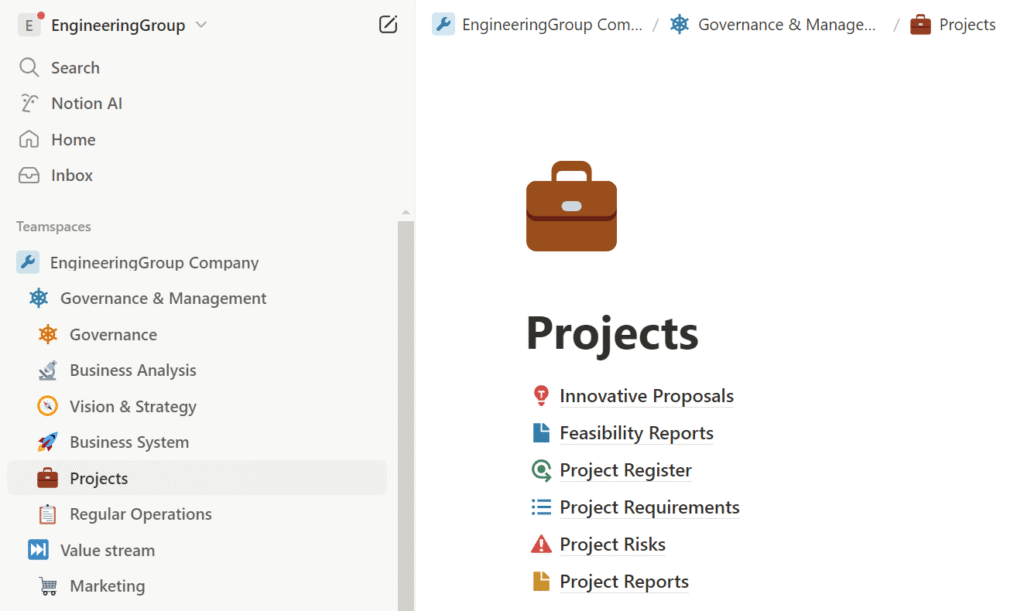
    Additionally, we have developed a set of project management tools designed to support not only systematization but the entire business. Unlike the business systematization tools placed in the ‘Business System’ section of the Notion workspace, project management tools are placed in the ‘Projects’ section according to the business process model.

    The Key Strategic Benefit

    The key strategic benefit of work done is that this systematization process model remains, on the one hand, simple and flexible, while on the other hand, it aligns with Level 5 (Optimizing) of the Capability Maturity Model Integration (CMMI). This provides the business with a number of advantages:

    1. Continuous Process Improvement
      • Organizations systematically identify weaknesses and strengthen processes.
      • Use of different business-analysis techniques ensures that problems are not just fixed, but prevented from recurring.
    2. Quantitative Decision-Making
      • Business and engineering decisions are based on data, not intuition.
      • Enables predictable outcomes in quality, cost, and schedule through statistical analysis.
    3. Innovation and Agility
      • Encourages the introduction of new tools, techniques, and technologies in a controlled and measured way.
      • High process maturity allows for faster adaptation to change while maintaining performance.
    4. High Customer Satisfaction
      • High reliability, predictable delivery, and consistent quality lead to stronger customer relationships and repeat business.
      • Organizations can offer clients customized improvements and better responsiveness.
    5. Operational Excellence
      • Reduced waste, rework, and defects through process optimization.
      • Higher productivity and lower costs over time.
    6. Competitive Advantage
      • Level 5 certification demonstrates world-class capability.
      • Often a requirement for large government or enterprise contracts, especially in defense, aerospace, and critical systems.
    7. Cultural Maturity
      • The entire organization is aligned around process excellence and learning culture.
      • Employees are empowered to propose improvements and are actively engaged in process performance.

    Summary and conclusions:

    In this article, we explored the development of the most optimal process model for building, developing, improving, and maintaining a business system. As a result, we arrived at a process mechanism that:

    1. Is universal, meaning it fits a wide range of businesses at any stage of development;
    2. Enables deeper engagement of the company’s personnel in business improvement activities, aligning with one of the key goals set by the business owner;
    3. Is fairly simple and flexible, allowing us to add certain operations and details to the described processes for more complex businesses—such as introducing audits to identify nonconformities—or, conversely, to simplify the process by replacing “Innovative Proposals” with simple “Ideas” and streamlining the development and approval of a Feasibility Report by replacing it with a “Project Candidate” for small businesses and startups;
    4. This process model for the life cycle of analysis, improvement, development, and support of the business system corresponds to the highest, fifth maturity level of the Capability Maturity Model Integration (CMMI) (Optimizing), meaning the business focuses on continuous process improvement.

    We have also completed the development of a full set of tools for business systematization and project management across the entire business. Now, we’re ready to move on to the fourth step: launching systematization and development projects to elevate the business to the next level.