Introduction: Why Your Business Feels Like a Constant Firefight
Imagine this: you own a service-based business – engineering, consulting, installation, maintenance, or any other field where the main product is delivering value to clients. But instead of focusing on growth and development, you spend most of your time putting out fires.
Marketing is impulsive and irregular. There is no complete, holistic picture of the market. Decisions are made based on intuition, and very often marketing is not viewed in the context of identifying and clarifying real market demand – instead, it is reduced entirely to promotion. As a result, the whole marketing effort boils down to random, “pulled out of thin air” campaigns. Most service companies have no understanding of why they need research and development activities at all, and the concept of “productization” of services is completely unknown to most owners and managers. The consequence is inaccurate and poorly targeted promotional campaigns, while salespeople chase deals without having clear pricing or detailed specifications from R&D — which ultimately leads to clients developing inflated or completely wrong expectations. The delivery team gets bogged down in manual task planning → deadlines are missed, quality drops, and the number of rework and fixes keeps growing. Accounting turns into an endless chase for payments and reconciliations, because order-related data is scattered across different files, spreadsheets, and messengers.
These aren’t rare exceptions — this is the daily reality for the majority of small and medium service businesses. Fragmented tools (Excel for marketing, Trello or paper for delivery, QuickBooks or spreadsheets for accounting) create silos, duplicate work, and constant errors. Manual processes steal 10 – 20 hours per week per employee. Poor lead nurturing and mismatched expectations cost 20–30% of potential revenue. And without integrated visibility across the entire value stream, you can’t spot trends, improve services, or scale without burning out yourself and your team.
But what if you could turn this chaos into a clear, automated, and predictable flow? That’s exactly what the Value Stream Process becomes inside your Notion-based Business Operating System (OS). It integrates marketing, research & development, promotion, sales, service delivery, and accounting into one connected system. It transforms reactive firefighting into proactive, sustainable growth – saving time, reducing errors, and increasing revenue through better key performance indicators and real business insight.
Why a Business OS Beats a Standalone CRM Every Time
Before diving in, let’s address the elephant in the room: Why not just implement a CRM like HubSpot or Salesforce, or even some custom based CRM? Buying a CRM is the first thing that comes to mind for most business owners. Why? Because it’s widely written and talked about, and because others have already purchased and implemented CRMs, such as our business partners and competitors. Yes, CRMs are truly great, but they remain narrow tools focused almost exclusively on the sales and customer-facing side. They rarely (if ever) cover the full value stream: from market analysis and service research & development, through promotion and delivery, all the way to accounting and post-delivery feedback. Result? More silos, not less.
My approach to a Notion-based Business OS is different and superior for service-oriented businesses:
- Holistic Integration: Covers the entire value creation flow, from market identification to billing, with global process tags (via Process Categories database) linking everything. A CRM might track leads, but an OS ensures marketing trends inform R&D, promotion strategies feed sales, and delivery feedback loops back to accounting. Importantly, this system includes all essential CRM features – like lead management, client interactions, proposals, contracts, and order tracking – but embeds them seamlessly within the end-to-end holistic flow of value creation, eliminating silos and enabling true business-wide efficiency.
- Process-First Design: Built on a hierarchical model (Process Categories > Groups > Processes), it starts with your business logic, not tool features. This avoids “digital chaos” and enables true automation.
- Affordable and Flexible: Notion + Make.com costs $10–50/month vs. CRM’s $100–500+. Customize without code; scale as you grow.
- Real-World Proven: Based on my engineering services company case, where this OS reduced delivery delays by 40% and improved lead conversion by 25%.
- Beyond Sales: CRMs excel at customer data but falter on internal ops. An OS adds views for forecasting, automations for invoicing, and integrations for seamless workflows – turning data into actionable strategy.
Implementing this in Notion isn’t about fancy pages; it’s about creating a living system that evolves with your business. Let’s build it step by step, focusing on the Value Stream pages and their databases, with effective views, built-in Notion tools, and Make.com integrations for automation.
Step-by-Step: Implementing the Value Creation Process in Notion
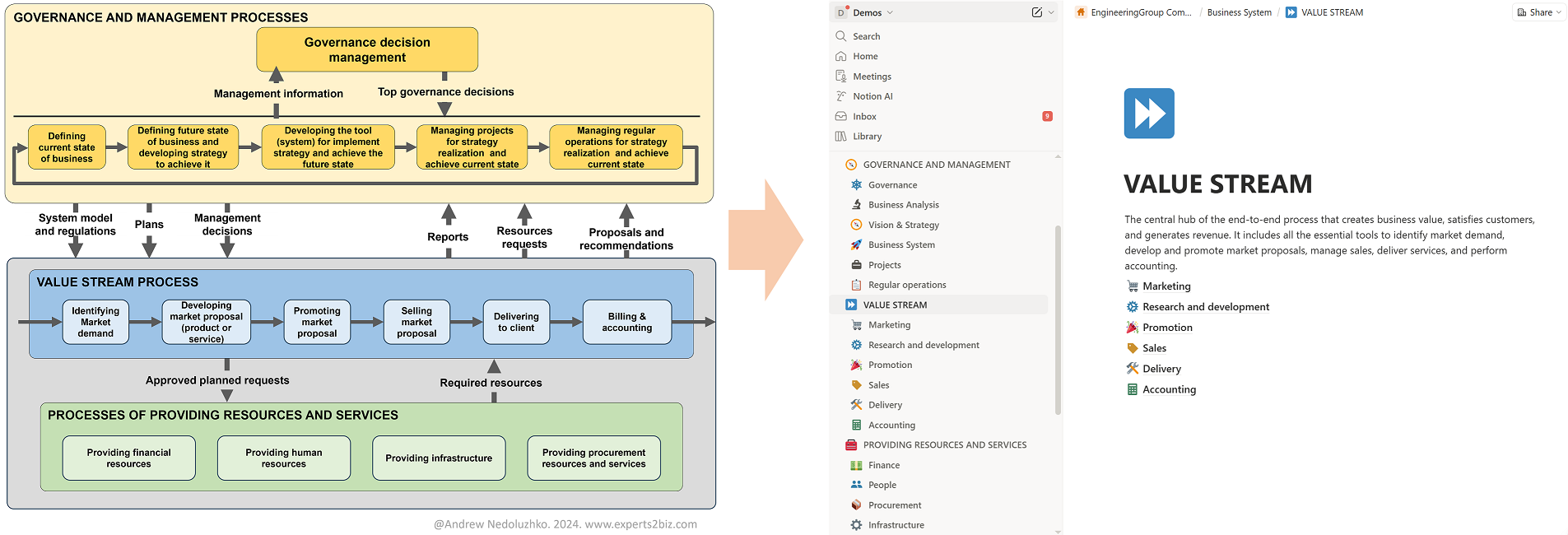
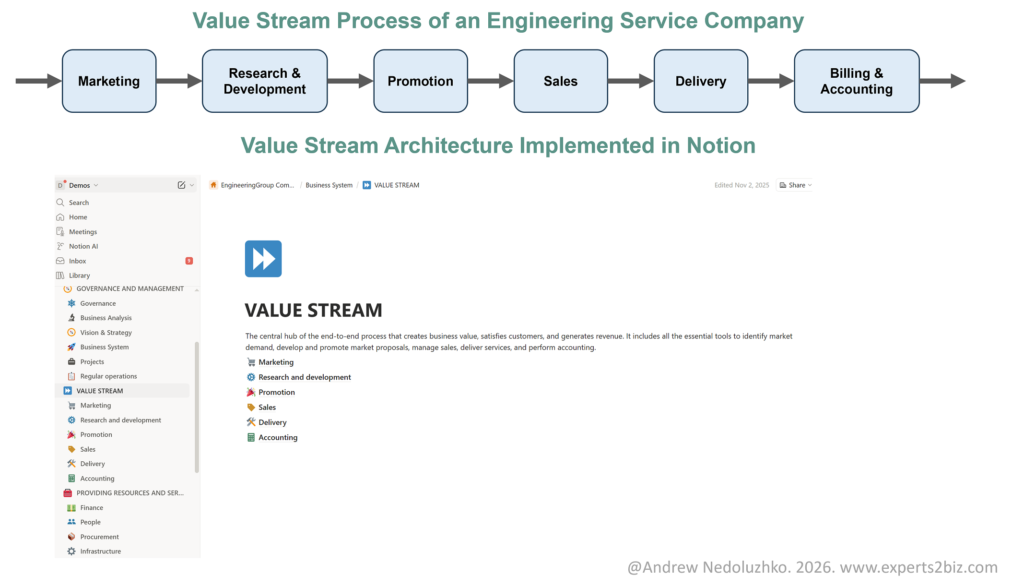
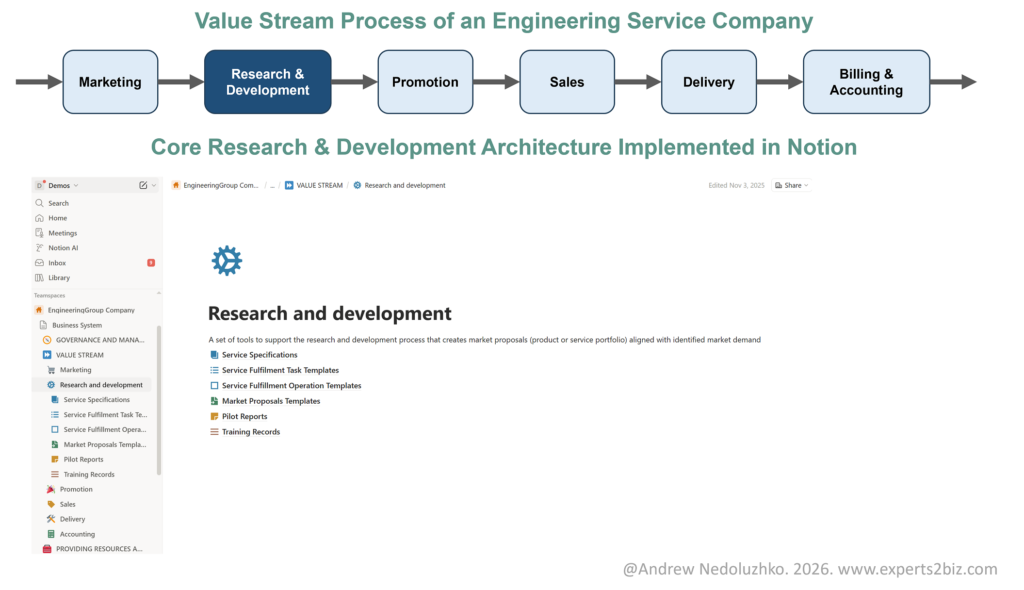
The method of designing such a business system was already covered in my previous articles. There, we defined the high-level model of the entire business processes and transformed it into a set of tags and sections (pages) in the Notion workspace. We have already detailed the Governance and Management section. Now it’s time to move on to the Value Stream sections: Marketing, Research & Development, Promotion, Sales, Delivery, Accounting (see Figure 1).
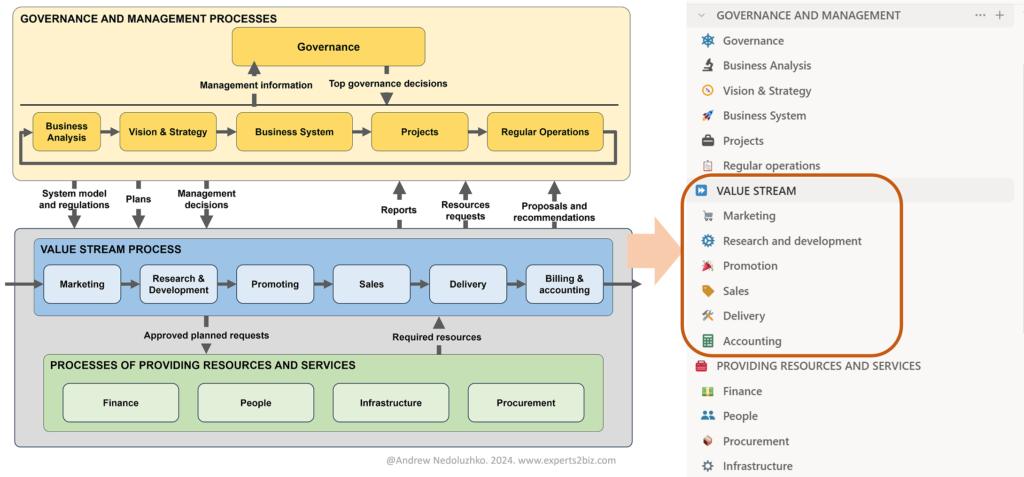
Each page will include specific databases required for seamless execution of the value stream as one integrated whole (Figure 2). Notion databases form the foundation for optimization and automation for any business that chooses this platform. After implementing correct and comprehensive database architecture, the business can progressively enhance its capabilities with Notion’s platform features such as multiple views for different perspectives and levels of detail, built-in automations, custom forms, external integrations, and AI capabilities to improve efficiency and achieve long-term growth and sustainability.
1. Marketing Page: Identifying Market Demand
This page represents a set of tools that support marketing processes to identify market demand and translate it into well-defined product or service concepts lays the foundation by capturing trends, segments, and clients—turning raw data into actionable insights (Figure 3).
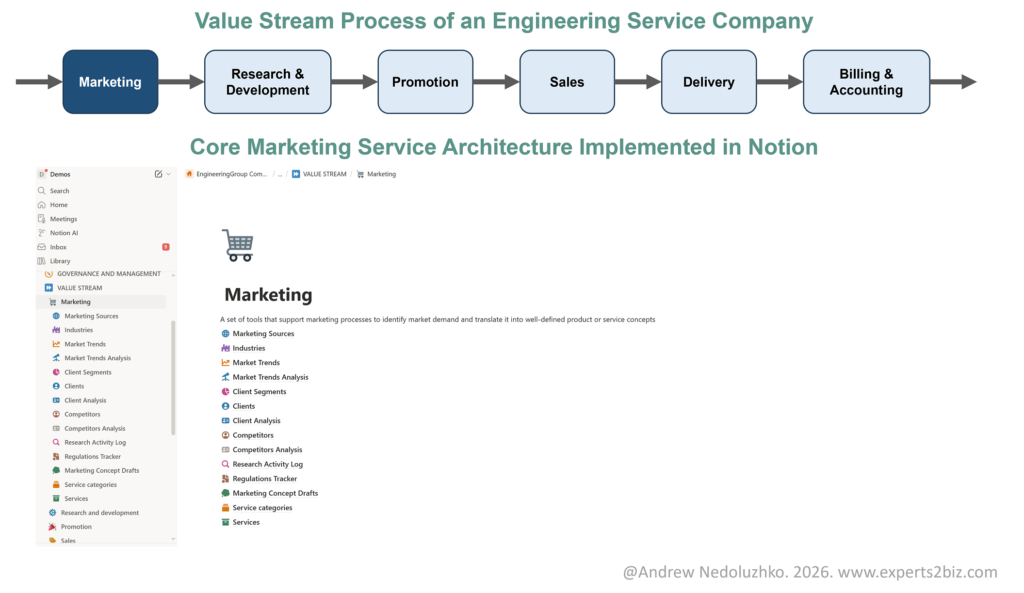
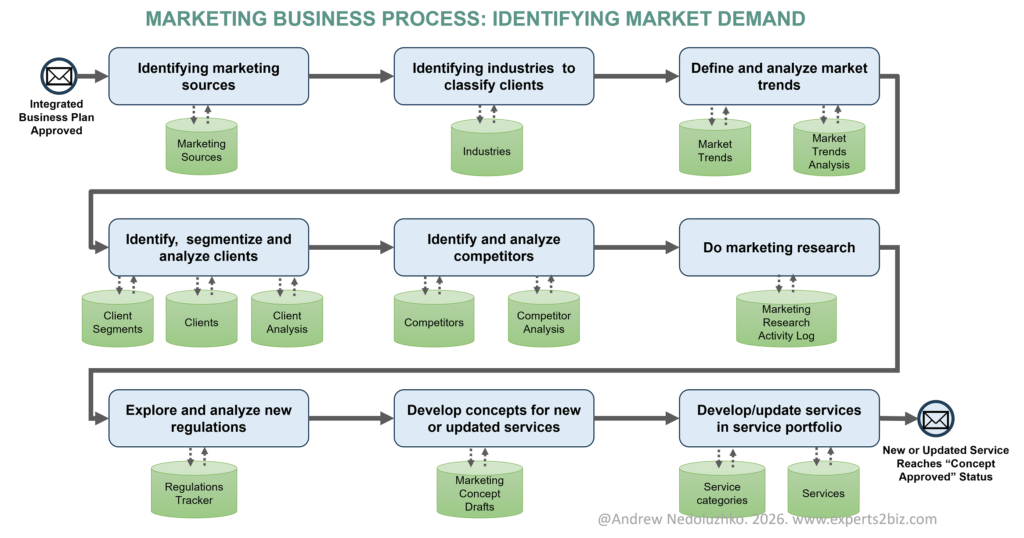
Key Databases that support marketing process (Figure 4):
- Marketing Sources: The Marketing Sources database serves as a centralized repository for identifying, tracking, and managing diverse marketing channels and information sources relevant to a business’s outreach and strategy.
- Industries: The Industries database defines industry categories to classify clients for improved segmentation, targeted analysis, and planning.
- Market Trends: The Market Trends database is used to identify and track market trends, particularly within the engineering services sector, to continuously improve and expand the service portfolio in response to market changes.
- Market Trends Analysis: This database systematically analyzes and categorizes external market trends, evaluating their potential impact on business strategy and guiding proactive marketing responses across different time horizons.
- Client Segments: The Client Segments database defines, categorizes, and prioritizes distinct client segments, serving as a strategic framework for targeted marketing, sales, and service development initiatives.
- Clients: The Clients database serves as a central hub for managing the entire client lifecycle, enabling comprehensive tracking, strategic prioritization, and data-driven marketing and sales decisions (Figure 5).
- Client Analysis: The Client Analysis database enables structured evaluation of client performance, profitability, and strategic potential to support targeted marketing, sales prioritization, and account development decisions (Figure 6).
- Competitors: The Competitors database serves as a central repository for identifying, tracking, and assessing key competitors, detailing their operational areas, threat levels, and current status for detailed strategic analysis.
- Competitor Analysis: The Competitors Analysis database serves as a centralized, dynamic repository for conducting, documenting, and referencing detailed analyses of market competitors, specific service offerings, and broader market benchmarks.
- Marketing Research Activity Log: The Research Activity Log database serves as a centralized log of marketing research initiatives, capturing key findings, insights, and resulting strategic decision.
- Regulations Tracker: The Regulation tracker database centrally tracks critical industry regulations, detailing their effective dates, impact on services, and required actions to ensure proactive organizational compliance.
- Marketing Concept Drafts: The Marketing Concept Drafts database serves as a structured workspace for systematically capturing, developing, and refining early-stage ideas into validated concepts for new or enhanced services within the portfolio (Figure 7).
- Service categories: This database defines and organizes high-level service categories, enabling structured classification and clear linkage to individual services for effective management and analysis.
- Services: The Services database serves as the central repository of all services offered by the business, systematically tracking each service from initial concept through active delivery and continuous improvement (Figure 8).
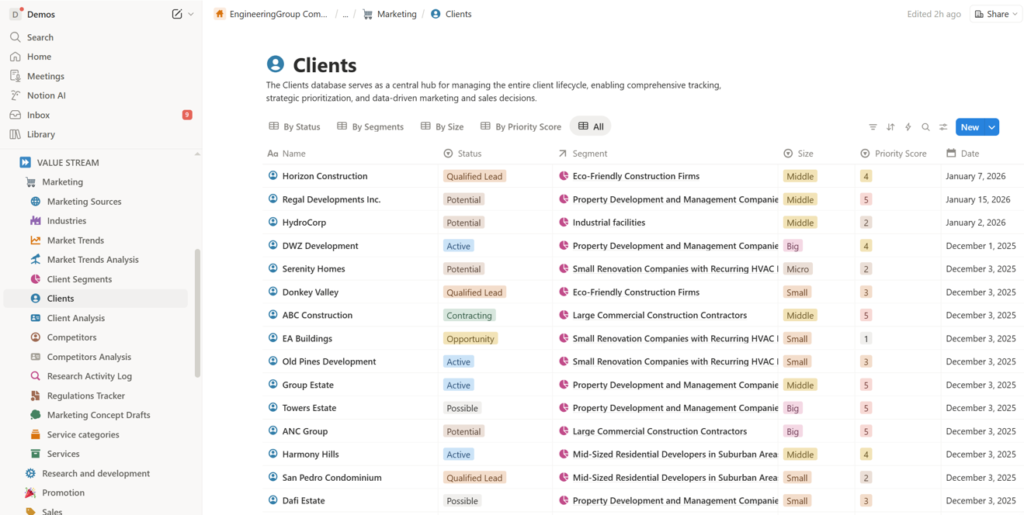
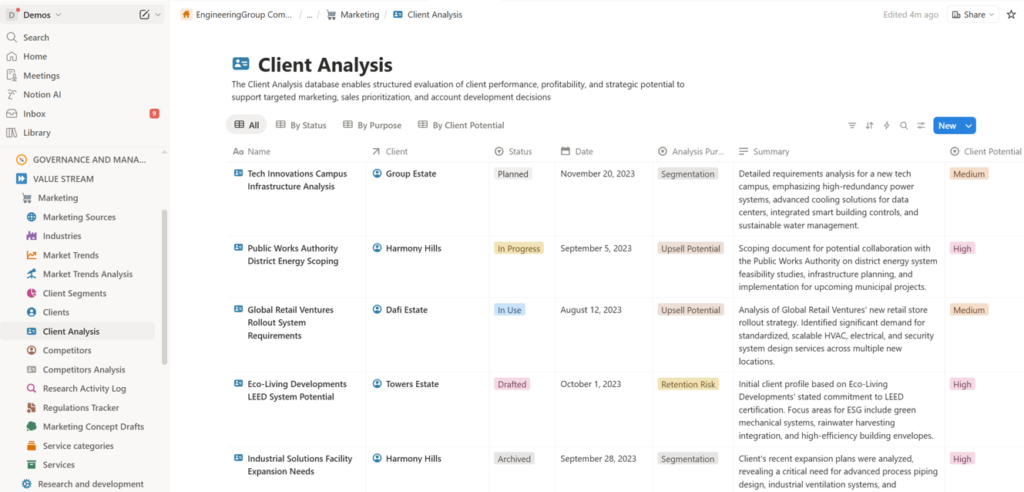
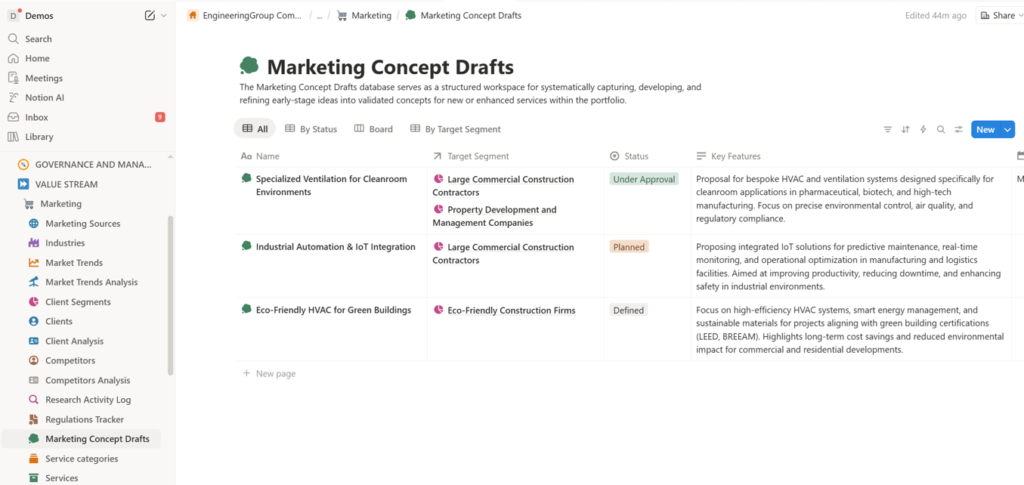
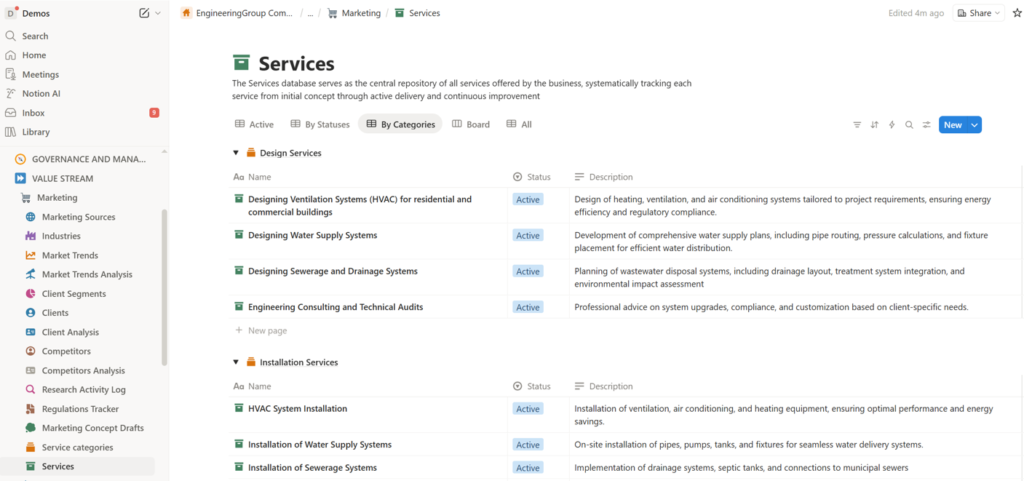
This setup solves pain points like missed trends by centralizing data, enabling quick pivots.
2. Research & Development Page: Developing Your Service Portfolio
Here, ideas evolve into promotion-ready services, transforming marketing insights into structured offerings through an integrated research and development process (Figure 9)
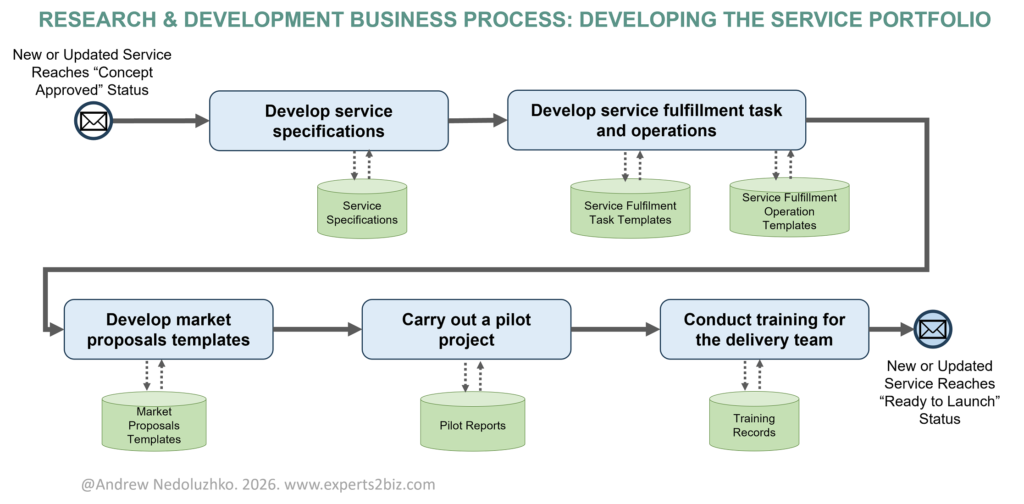
Key Databases that support research & development process (Figure 10):
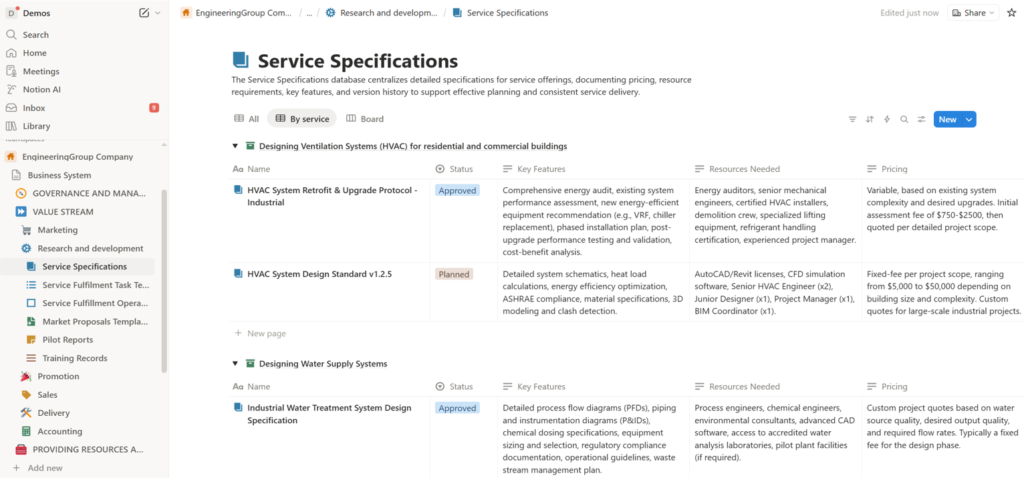
- Service Specifications: The Service Specifications database centralizes detailed specifications for service offerings, documenting pricing, resource requirements, key features, and version history to support effective planning and consistent service delivery (Figure 11).
- Service Fulfilment Task Templates: This database serves as a centralized repository of standardized task templates, defining repeatable procedures, resource requirements, and task dependencies to support structured planning and fulfillment of contracted service engagements.
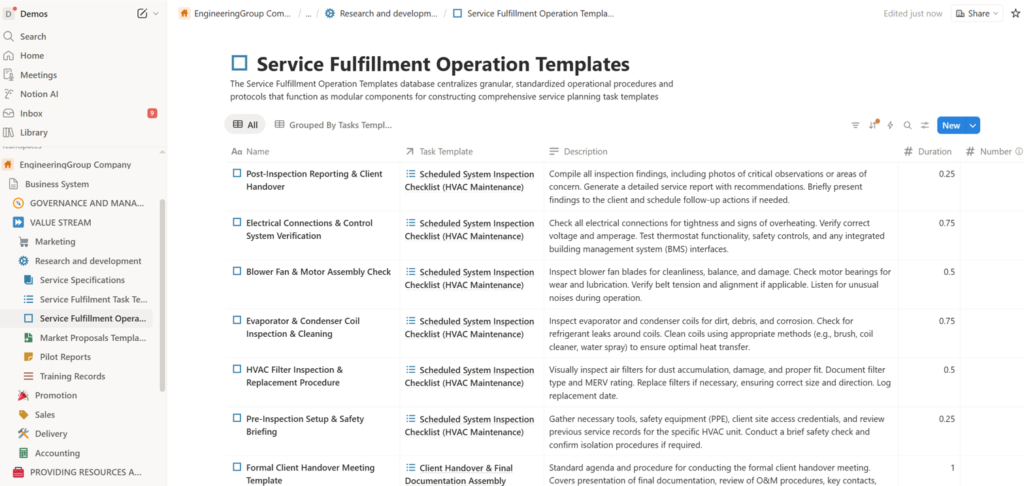
- Service Fulfillment Operation Templates: The Service Fulfillment Operation Templates database centralizes granular, standardized operational procedures and protocols that function as modular components for constructing comprehensive service planning task templates (Figure 12).
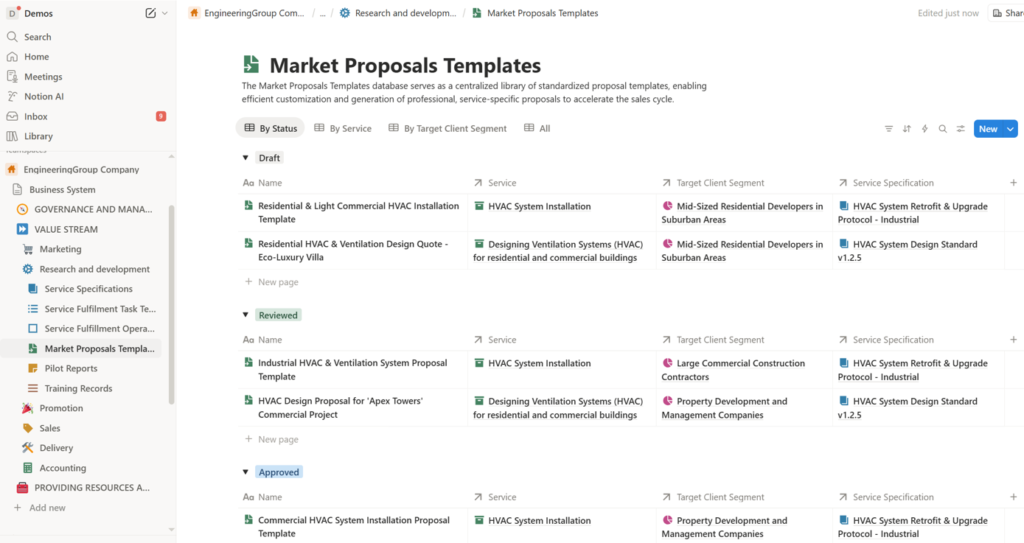
- Market Proposals Templates: The Market Proposals Templates database serves as a centralized library of standardized proposal templates, enabling efficient customization and generation of professional, service-specific proposals to accelerate the sales cycle (Figure 13).
- Pilot Reports: The Pilot Reports database serves as a centralized repository for tracking, evaluating, and learning from experimental project phases, systematically capturing client feedback, documenting actionable lessons, and assessing pilot outcomes to drive continuous improvement.
- Training Records: The Training Records database meticulously tracks all training activities related to specific services within the company’s portfolio, documenting key details, participant information, and feedback.
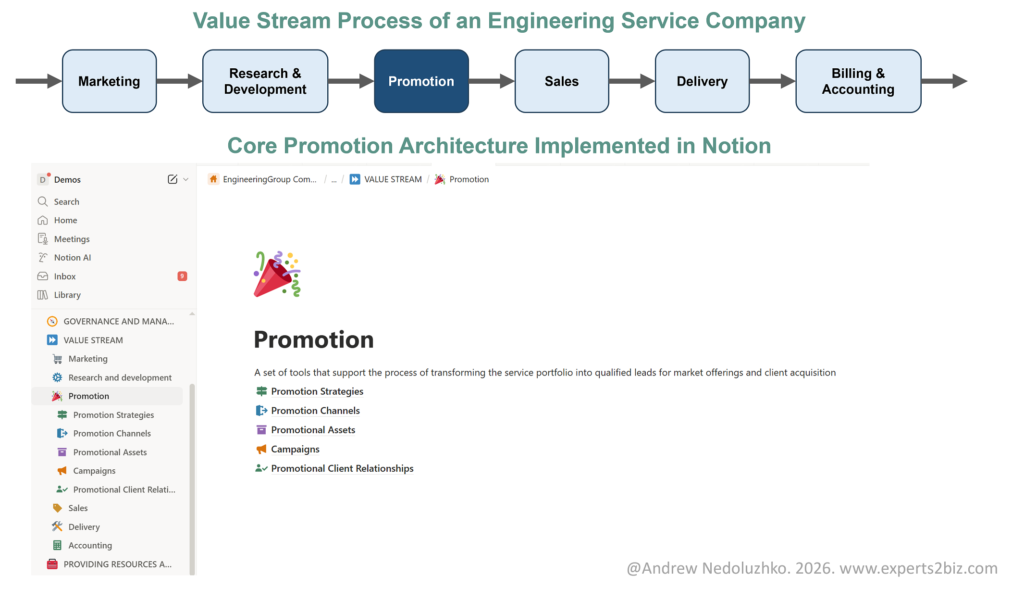
3. Promotion Page: Transform the service portfolio into qualified leads for market offerings and client acquisition
Focus on strategies and campaigns that generate awareness and leads throughout an effective promotion process (Figure 14).
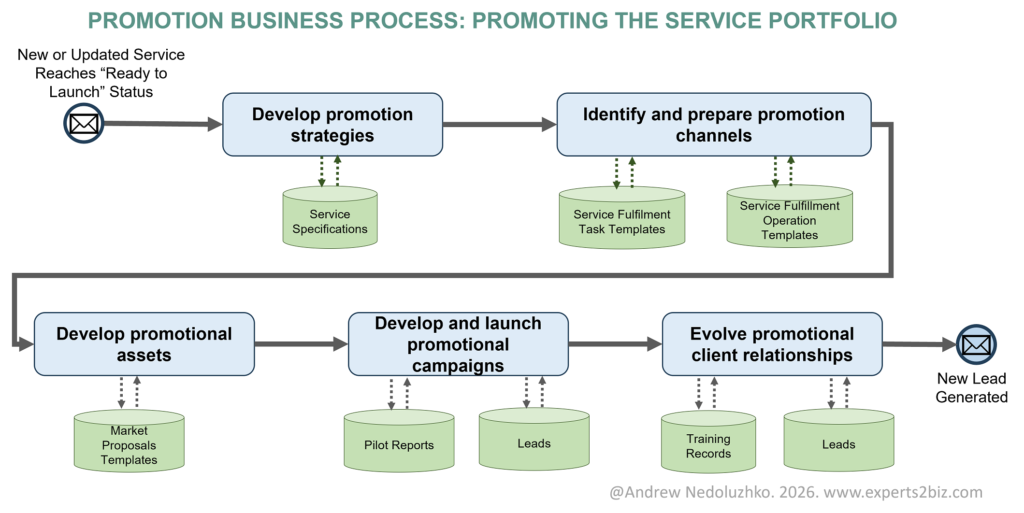
Key Databases that support promotion process (Figure 15):
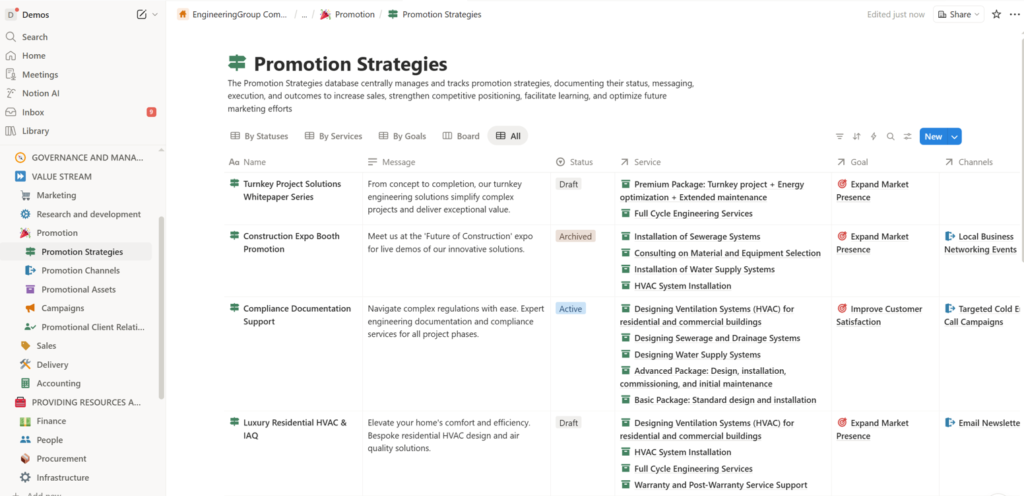
- Promotion Strategies: The Promotion Strategies database centrally manages and tracks promotion strategies, documenting their status, messaging, execution, and outcomes to increase sales, strengthen competitive positioning, facilitate learning, and optimize future marketing efforts (Figure 16).
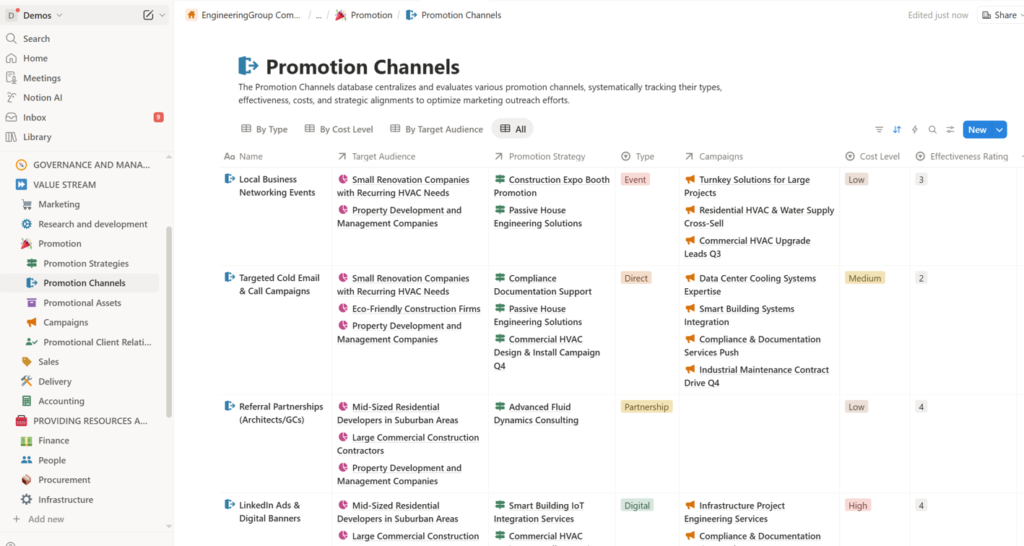
- Promotion Channels: The Promotion Channels database centralizes and evaluates various promotion channels, systematically tracking their types, effectiveness, costs, and strategic alignments to optimize marketing outreach efforts (Figure 17).
- Promotional Assets: This database serves as a centralized repository for tracking and managing all promotional marketing assets, detailing their type, associated campaigns and services, responsible owners, and current lifecycle status.
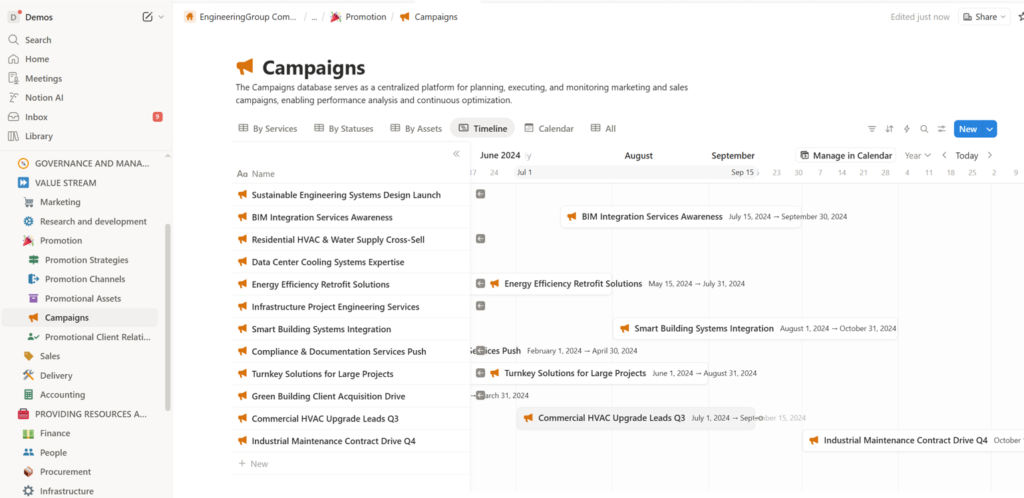
- Campaigns: The Campaigns database serves as a centralized platform for planning, executing, and monitoring marketing and sales campaigns, enabling performance analysis and continuous optimization (Figure 18).
- Promotional Client Relationships: The Promotional Client Relationships database tracks post-engagement client satisfaction and relationship status, identifying high-performing projects and advocates to leverage testimonials, referrals, and case studies in support of marketing and sales growth.
4. Sales Page: Converting Leads to Contracts
Bridging client interest and commitment, ensuring a seamless handoff to delivery through the sales process (Figure 19).
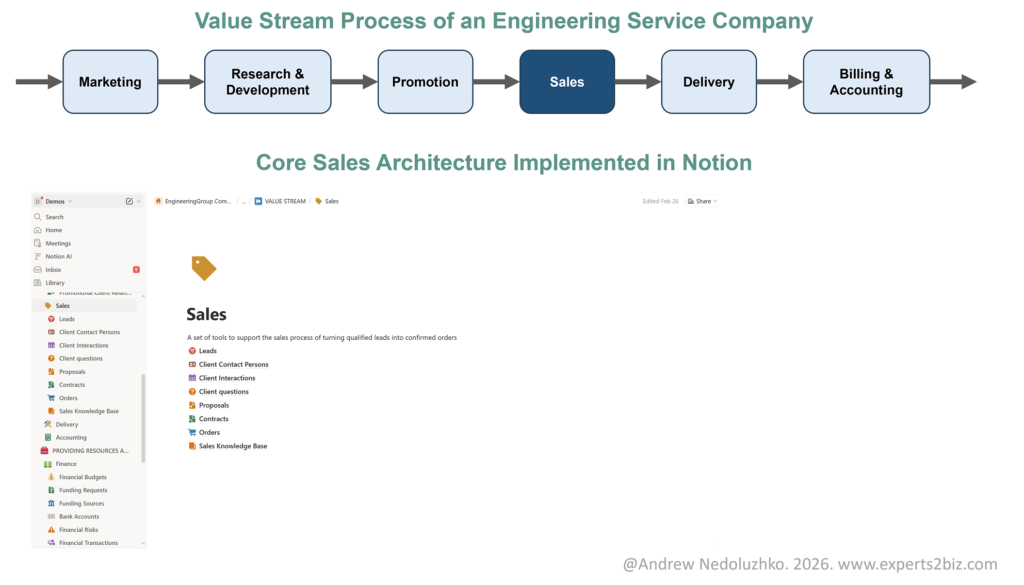
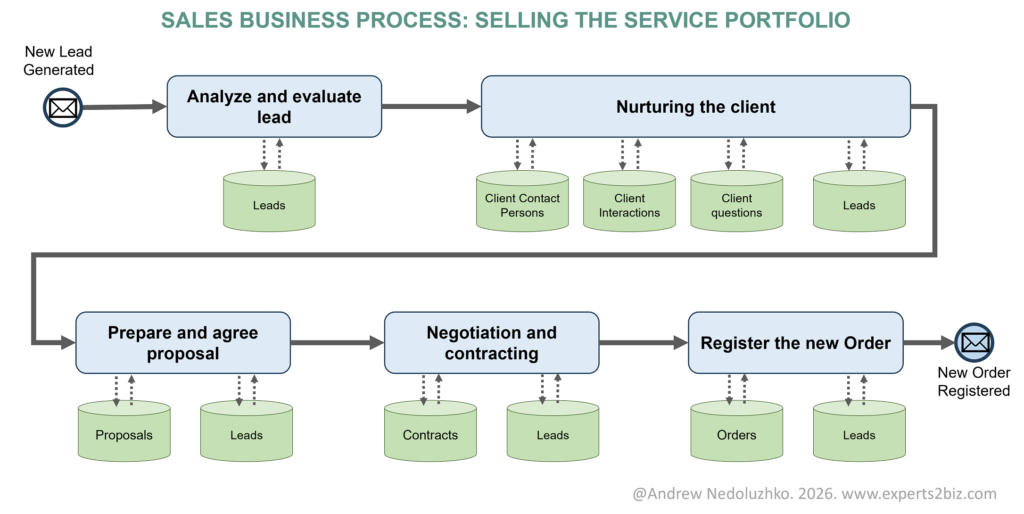
Key Databases that support sales process (Figure 20):
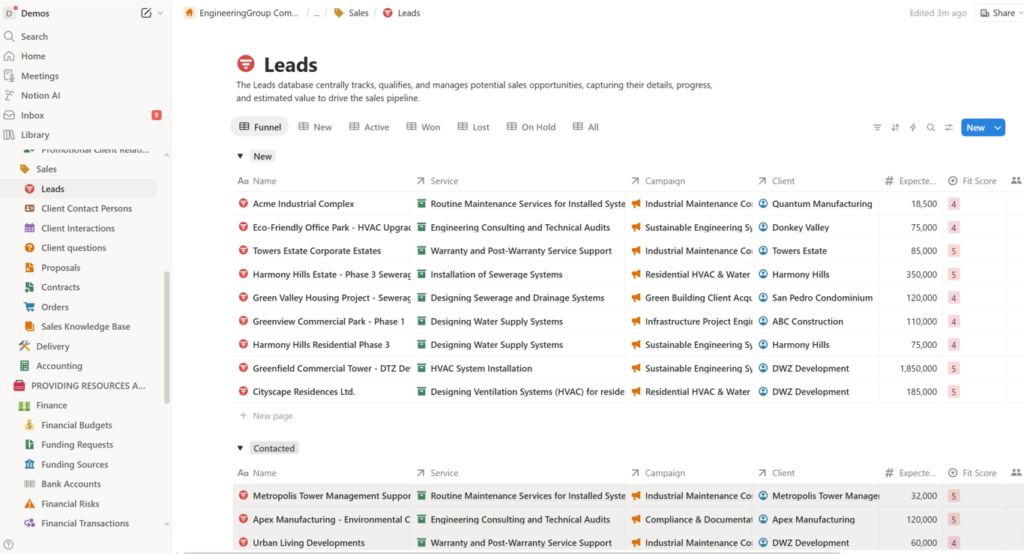
- Leads: The Leads database centrally tracks, qualifies, and manages potential sales opportunities, capturing their details, progress, and estimated value to drive the sales pipeline (Figure 21).
- Client Contact Persons: The Client Contact Persons database serves as a centralized hub for managing detailed contact information, roles, and contextual notes for individual client representatives, prospective leads, and key external stakeholders.
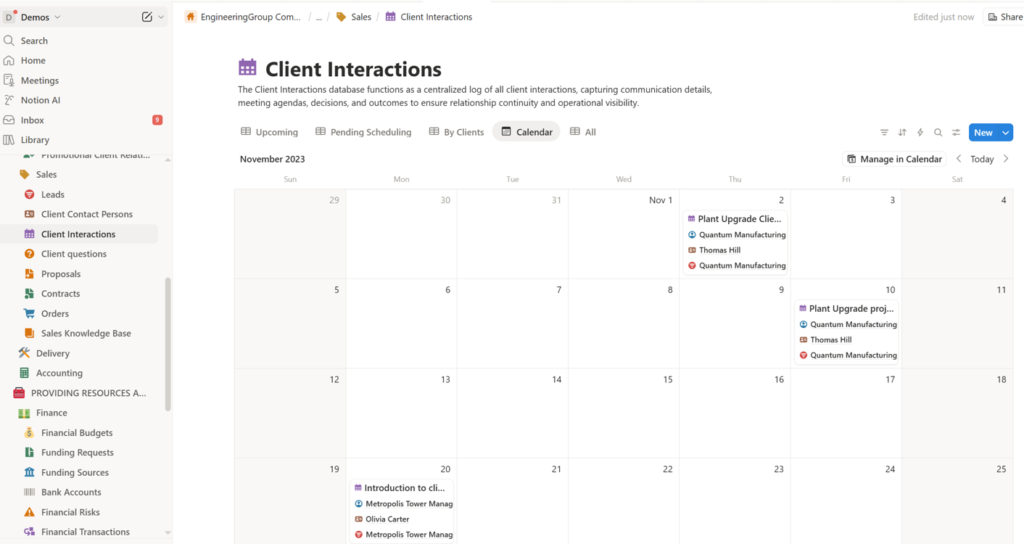
- Client Interactions: The Client Interactions database functions as a centralized log of all client interactions, capturing communication details, meeting agendas, decisions, and outcomes to ensure relationship continuity and operational visibility (Figure 22).
- Client Questions: The Client questions database centralizes client inquiries, categorizing them, tracking dates, recording answers, and linking them to specific client interactions for comprehensive question management and experience retention.
- Proposals: The Proposals database serves as a centralized repository for tracking the lifecycle of client proposals, from initial drafting and submission to acceptance, documenting scope, pricing, and key interactions.
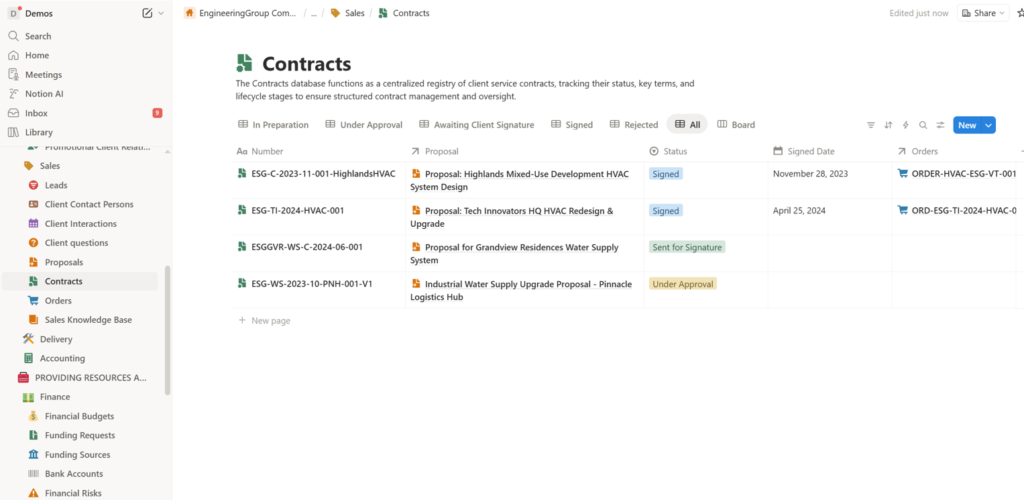
- Contracts: The Contracts database functions as a centralized registry of client service contracts, tracking their status, key terms, and lifecycle stages to ensure structured contract management and oversight (Figure 23).
- Orders: The Orders database comprehensively manages and tracks all orders, integrating contractual details, team assignments, fulfillment schedules, financial processes, and quality assurance for complete project oversight.
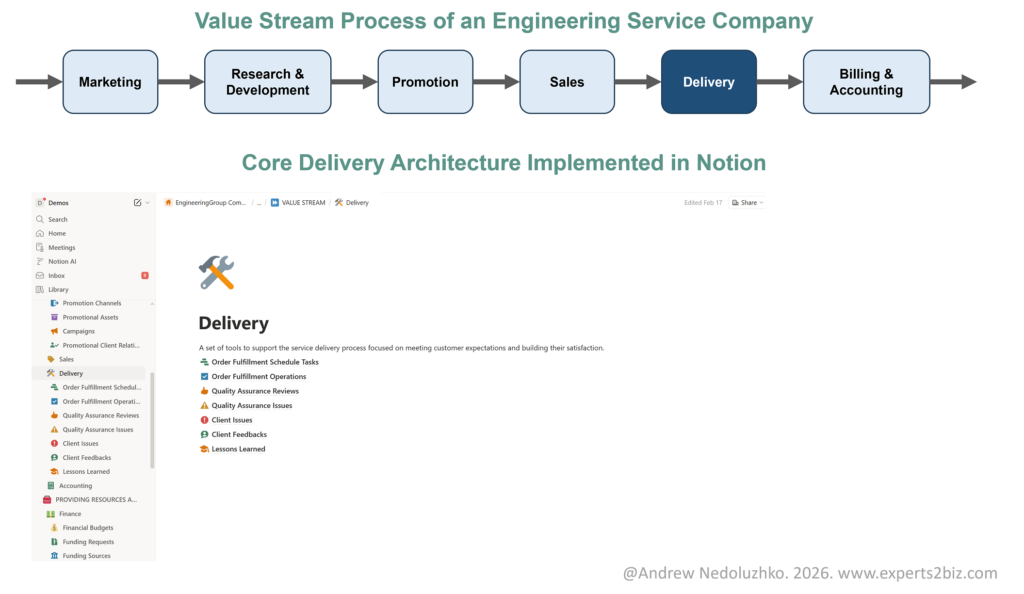
5. Delivery Page: Executing Services Flawlessly
The operational heart: task execution, quality control, client feedback and lessons learned to ensure client satisfaction in the service delivery process (Figure 24).
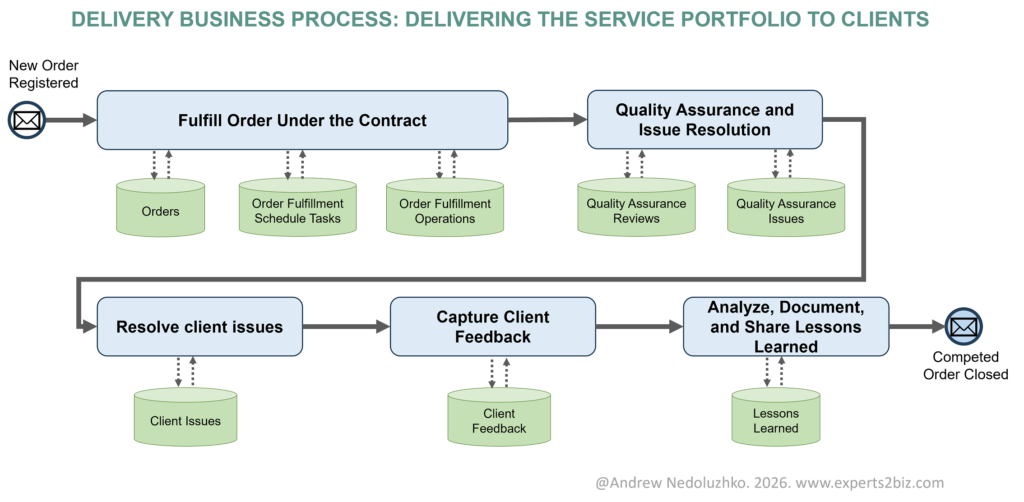
Key Databases that support delivery process (Figure 25) :
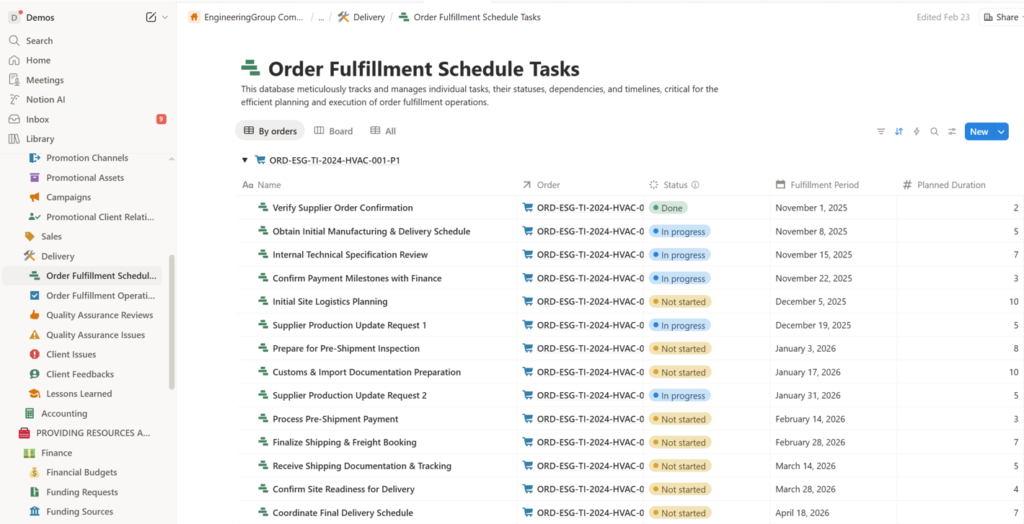
- Order Fulfillment Schedule Tasks: This database meticulously tracks and manages individual tasks, their statuses, dependencies, and timelines, critical for the efficient planning and execution of order fulfillment operations (Figure 26).
- Order Fulfillment Operations: This database meticulously tracks individual operational steps within order fulfillment tasks, recording actual durations and completion for performance analysis and process optimization.
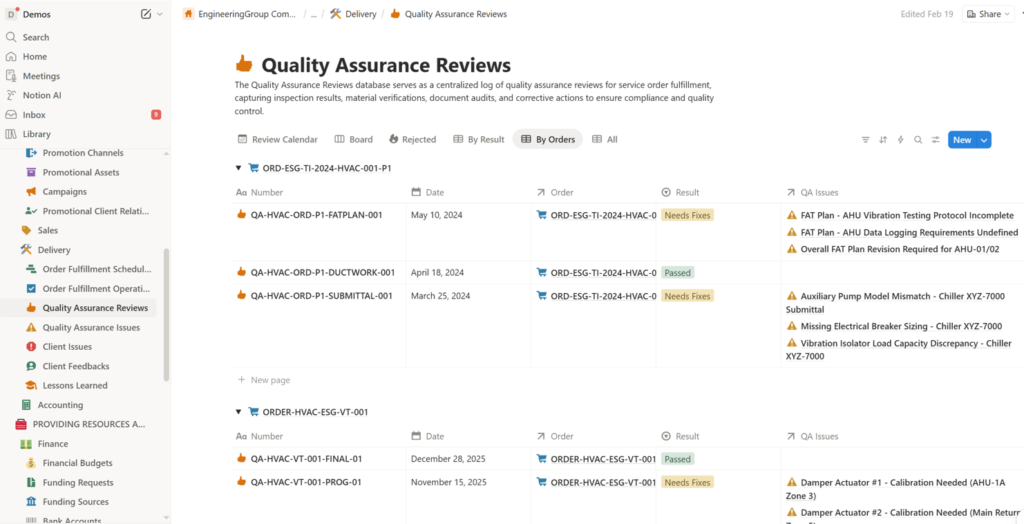
- Quality Assurance Reviews: The Quality Assurance Reviews database serves as a centralized log to control quality for service order fulfillment, capturing inspection results, material verifications, document audits, and corrective actions to ensure compliance and quality control (Figure 27).
- Quality Assurance Issues: The Quality Assurance Issues database serves as a centralized registry of quality assurance issues arising from quality reviews, tracking defects, non-conformances, root causes, and corrective actions throughout their resolution lifecycle.
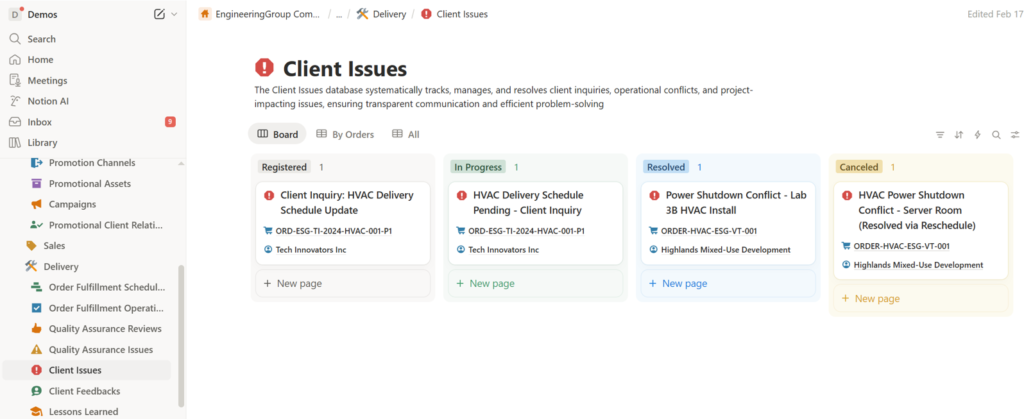
- Client Issues: The Client Issues database systematically tracks, manages, and resolves client inquiries, operational conflicts, and project-impacting issues, ensuring transparent communication and efficient problem-solving (Figure 28).
- Client Feedbacks: The Client Feedbacks database serves as a centralized repository for client feedback, capturing satisfaction metrics and improvement insights to drive continuous service improvement and relationship development.
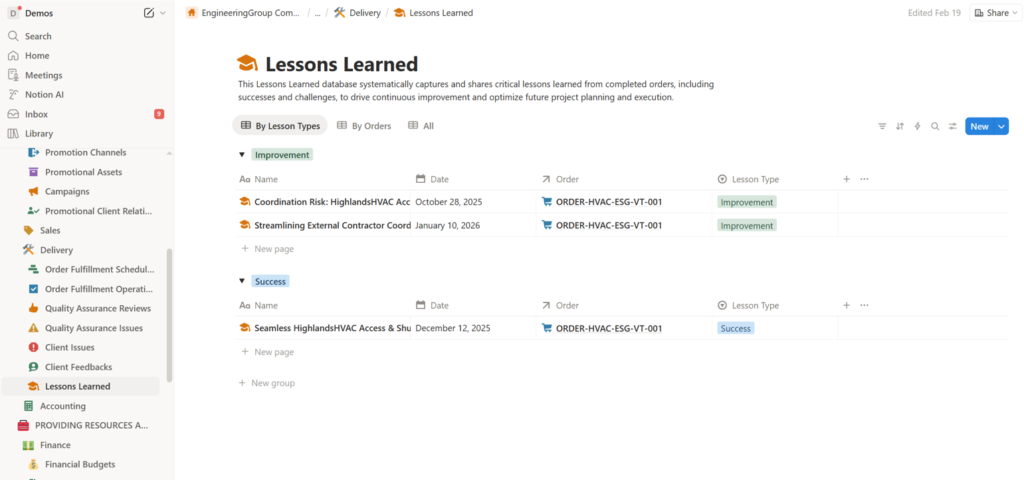
- Lessons Learned: This Lessons Learned database systematically captures and shares critical lessons learned from completed orders, including successes and challenges, to drive continuous improvement and optimize future project planning and execution (Figure 28).
6. Accounting Page: Closing the Loop with Billing
Ensuring payments and reports tie back to the value stream through the billing and accounting process (Figure 30).
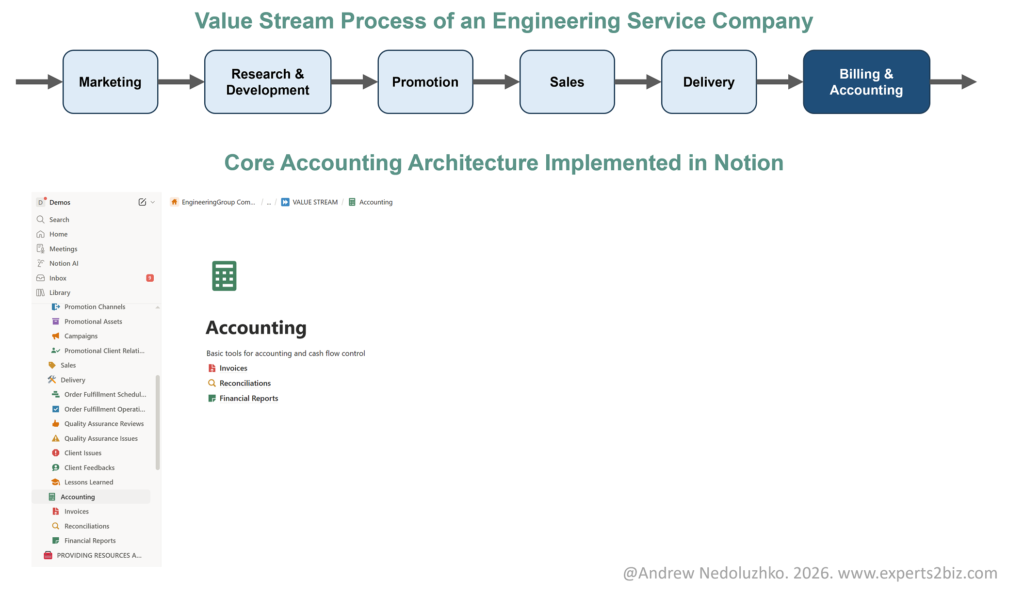
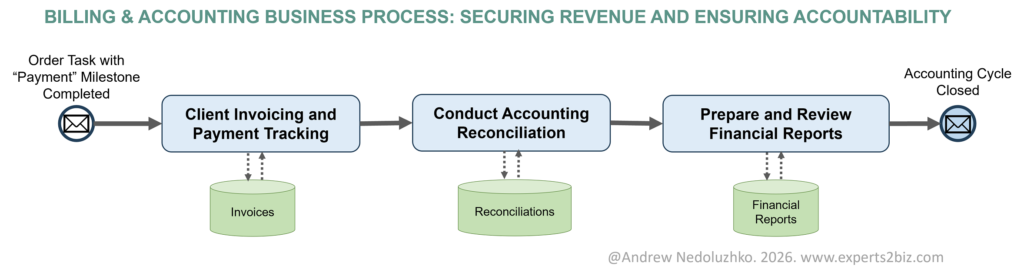
Key Databases that support billing & accounting process (Figure 31):
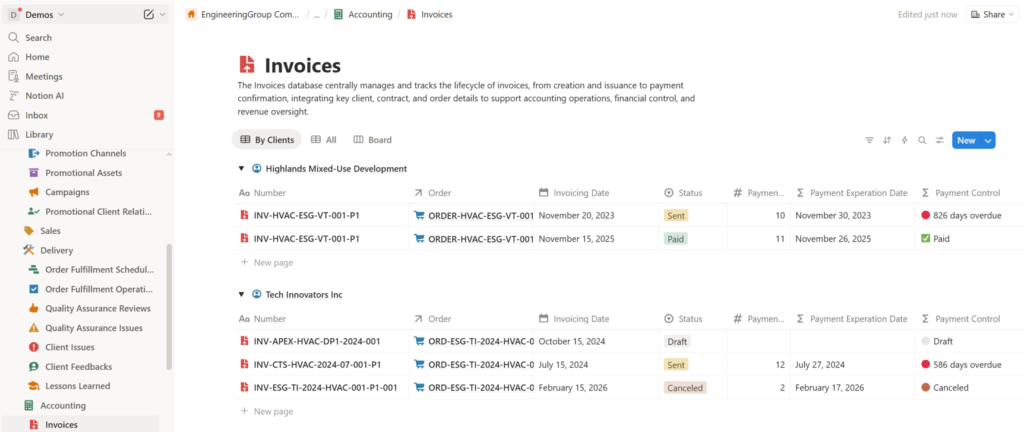
- Invoices: The Invoices database centrally manages and tracks the lifecycle of invoices, from creation and issuance to payment confirmation, integrating key client, contract, and order details to support accounting operations, financial control, and revenue oversight (Figure 32).
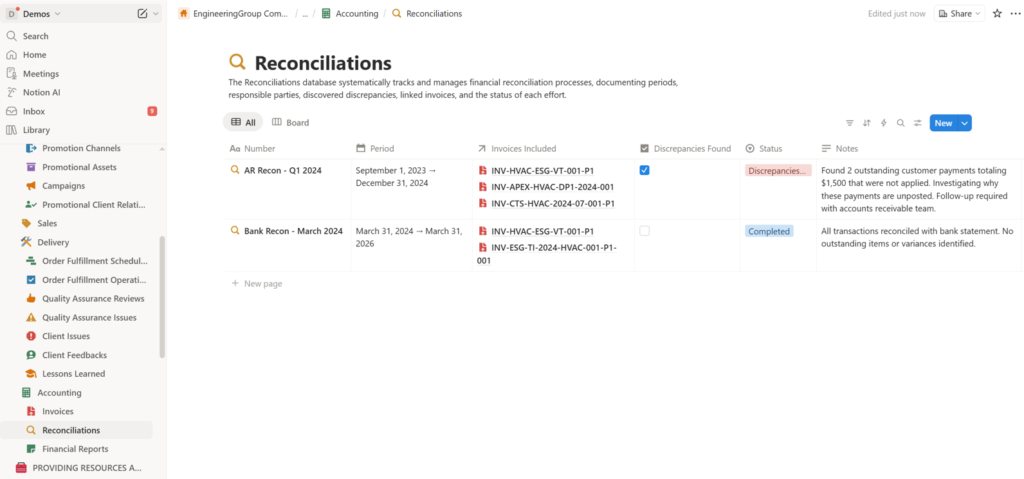
- Reconciliations: The Reconciliations database systematically tracks and manages financial reconciliation processes, documenting periods, responsible parties, discovered discrepancies, linked invoices, and the status of each effort (Figure 33).
- Financial Reports: The Financial Reports database manages financial reports, tracking invoiced amounts and payments, integrating with orders, and preparing for future profitability analysis to provide comprehensive financial oversight.
Conclusion: Your Path to a Scalable Business OS
By implementing this Value Stream Process in Notion, you’re not just automating — you’re building a resilient system that grows with your business. Start small. Iterate as you design and implement a correct and comprehensive database architecture. Then progressively enhance it with multiple database views for different perspectives and levels of detail. Add automations using native Notion tools and third-party platforms like Make.com for advanced workflows. Integrate your system with other apps and tools, and further increase efficiency with AI capabilities. As the system evolves, you will observe operational and management problems gradually disappear. Ready to transform? Duplicate this framework and adapt it to your needs.