
Building on the foundational steps of systematizing business using Notion, this article delves into the second crucial step: designing a comprehensive business system framework. Learn how to structure interconnected components like goals, processes, indicators, and organizational roles. By understanding these relationships, you’ll gain a clearer path to building the required business system with reduced effort, risk, and cost. This article provides actionable insights and a practical guide to designing a scalable, robust and efficient business system framework using Notion.
The previous article outlined the first step to systematize the business and implement Notion, including defining a high-level model of all business processes, creating a Notion workspace structure based this model, creating “Process Tags” database table and master “Tasks” database table to organize current tasks by high-level processes. We also looked at the benefits this solution provides, demonstrating its value and the potential of the work accomplished. For some businesses, this might be enough, but what about companies striving to achieve more significant goals, as in the business case under consideration?
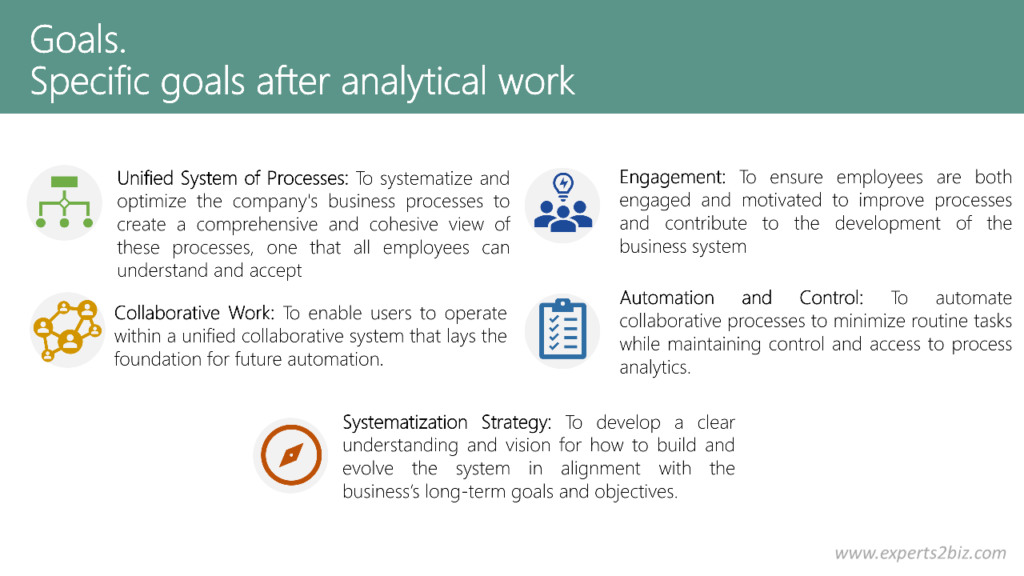
We have already established that achieving these goals is done through systematization—that is, by building and implementing an efficient business system. The next step, which we will unpack in this article, is designing the framework of this business system. This will help us gain a deeper understanding of how business processes should be structured and executed to achieve the set goals.
The resulting framework will serve as:
- A foundation for planning and executing the next steps in systematization and automation.
- A basis for the business knowledge base, which will evolve as systematization and automation plans are implemented.
This knowledge base will be used for training, minimizing errors among all individuals involved in business operations, and monitoring and resolving issues that arise in the course of business activities.
Of course, to design like business system framework correctly, we must have the appropriate competencies, techniques, tools, and practical experience. I have done this multiple times using various tools, and that’s why I want to provide you with the best way to do this using Notion, as well as explain in detail how to use the resulting outcome as effectively as possible.
Components of Business System
A real complete business system that will really boost your business include the following interconnected component:
- Goals – the goals list structured from high-level long-term strategic goals that shows what business want to achieve to operational level goals of processes.
- Processes – structured list of business processes from high level business processes that defined as we describe in previous article to more low level processes. This list illustrate how all operations are structured and executed to achieve company’s objectives.
- Indicators – a list of key performance indicators that show how we can measure results, ranging from individual processes to company-wide metrics, allowing tracking of whether the business is achieving its planned goals.
- Organizational structure – a list of the company’s positions or team roles that defines the hierarchy and areas of responsibility.
- Objects – a list of all material and non-material items, such as documents, assets, inventory, equipment, tools, materials, and other resources, with which the company operates through its processes.
It is also necessary to highlight two categories of objects that play a crucial role in building a business system, making it convenient to include them separately as system components:
- IT systems and apps – a structured list of IT systems and applications, along with their functions, that the business needs to use to improve efficiency and manage data properly.
- Databases – list of databases, database tables, datasets, or database entities that IT systems can use to store business data. This list is optional because databases are also considered objects.
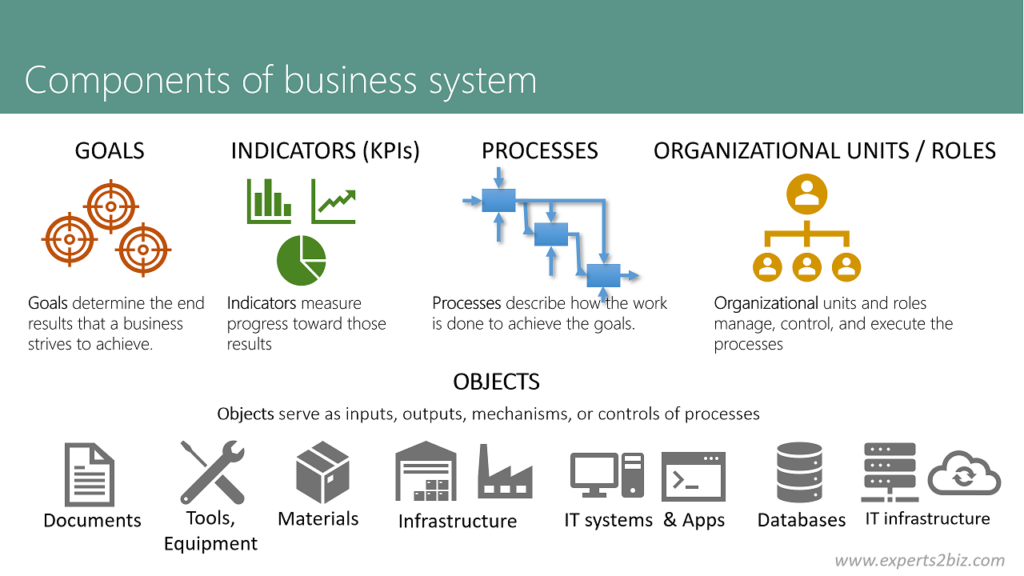
‘Interconnected’ mean that items of this components connected to each other to fully understand how all aspects of the business system work:
- Connections between Goals and Indicators show how are goals achievement measured
- Connections between Indicators and Processes show which processes yield which indicators
- Connections between Processes and Objects shows which objects are associated with which processes and what operations are performed on these objects within the processes
- Connections between Processes and Oganizational Structure or Team Roles show which position (role) owns the process and which position (role) performs specific operations in each process
- Connections between Processes and IT systems or apps show which IT systems and applications are needed for business processes and what functions they should have to ensure maximum process efficiency
- Connections between Processes and Databases indicate which databases are used in specific business processes, detailing how these databases support data storage, retrieval, and management to ensure accurate and efficient process execution. These connections also define what data is created, updated, or utilized during the execution of each process.
So, comprehensive lists of business system components and the connections between their items provide an extremely detailed picture of the business, offering invaluable support for building, implementing, maintaining, and improving the business system in the most rational and cost-effective way. Notion provides the tools to do this work quite effectively:
- We can use database tables to create a structured and hierarchical lists.
- We can use relations between database tables to build connections between items of business system components, and set up very useful views.
- We can setup templates for items of database tables to show information as documents with additional schemes and diagrams where it is needed and create any kind of regulations, instructions and requirement specifications.
But Notion also has its limitations. For example, we cannot implement a fully comprehensive and convenient functionality for describing an exhaustive activity model for any business within the Notion environment. Additionally, Notion databases are of the NoSQL type, which also affects the final result. However, the advantages and accessibility of the Notion product outweigh these shortcomings, so we simply need to take these limitations into account during the work process.
So, let’s do it to see real example and better understand benefits of work done.
Planned Tasks in Designing a Business System Framework
Having understood the components that make up a business system, we can begin creating a tool within the Notion environment to design these components and, ultimately, build the business system framework and its further development into an effective, resilient, and viable system. That is why we create the following list of tasks with “Business System” tag in our “Task” database table and start executing them:
- Create Goals database table.
- Create Processes database table.
- Create Organization database table.
- Create Indicators database table.
- Create Objects database table
- Create some additional databases for processes. As we now the definition of term ‘Process’ any process – a purposeful set of interrelated, regularly recurring activities (a sequence of tasks) that, following a specific technology, transforms inputs into outputs according to defined rules using certain mechanisms:
- ‘Objects. Usage in process’ database table to connect Processes database with Objects database table that are used as Inputs, Controls, Outputs, Mechanisms of Processes (ICOM) and help us understand in which process which object is used;
- ‘Organization. Participation in processes’ database table to connect Processes with organization units and roles and helps us understand in which process which position or role performs which function;
- ‘Object. Categories’ for easy object structuring;
- ‘Object. Usage Types’ to mark object in ‘Objects. Usage in process’ database table as Input, Output, Control or Mechanism.
- Create, one more, important database to store definition of terms named Definitions.
- Create relations between databases:
- Goals with Indicators;
- Indicators with Processes;
- Processes with Objects. Usage in process;
- Processes with Organization. Participation in processes;
- Organization with Organization. Participation in processes.
- Populate Processes Database with real business processes list.
- Populate others Databases with some example data and show results.
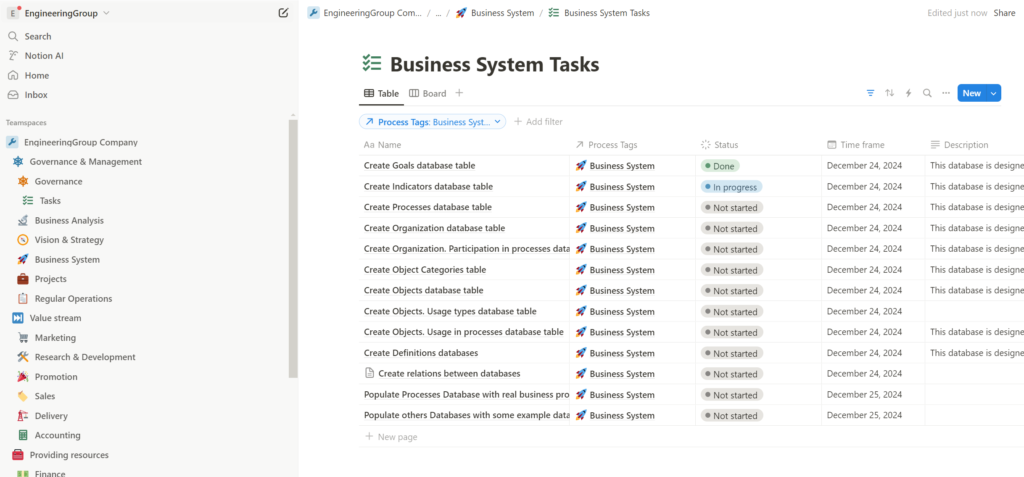
Notice! We are already using our Notion workspace to build our system and accumulate historical information about our activities, which can be used for analysis and to draw valuable conclusions in the future.
Benefits of the Work Done
Goals database table
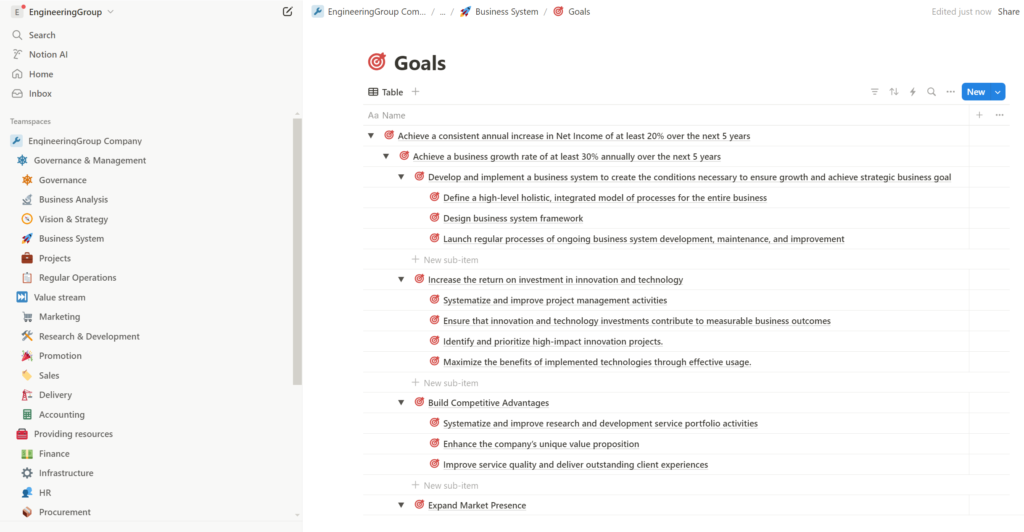
Using the “Goals” database table, along with Notion’s capabilities and the proposed methodology, provides businesses with a strategic management tool that enables them to:
- Create a structured list of strategic goals and break them down to the level of individual projects, processes, and positions. This ensures that the strategy is communicated to every employee, allowing all individuals involved in the business to understand their contribution to both current operations and the company’s future.
- Simplify and optimize strategic management processes, making them accessible even to relatively small businesses.
- Manage long-term vision, strategy, and strategic plans as they evolve and as new data becomes available, including actual company performance metrics.
Indicators database table
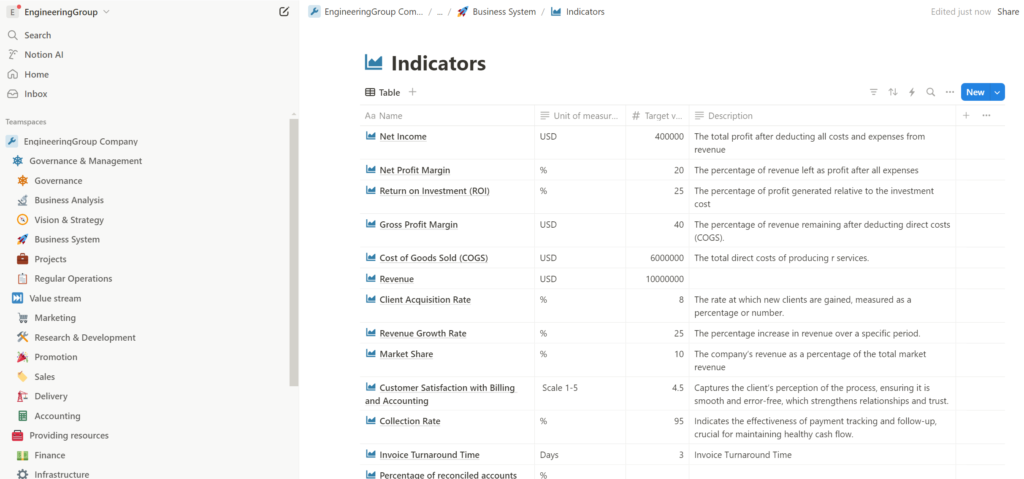
Using the “Indicators” database table allows us to define and classify the indicators (KPI’s) needed to measure the business. We can also set target control values that the business must achieve to realize its vision and strategy. Later, we will use these indicators for project management and regular operations management within the corresponding processes to monitor and optimize them.
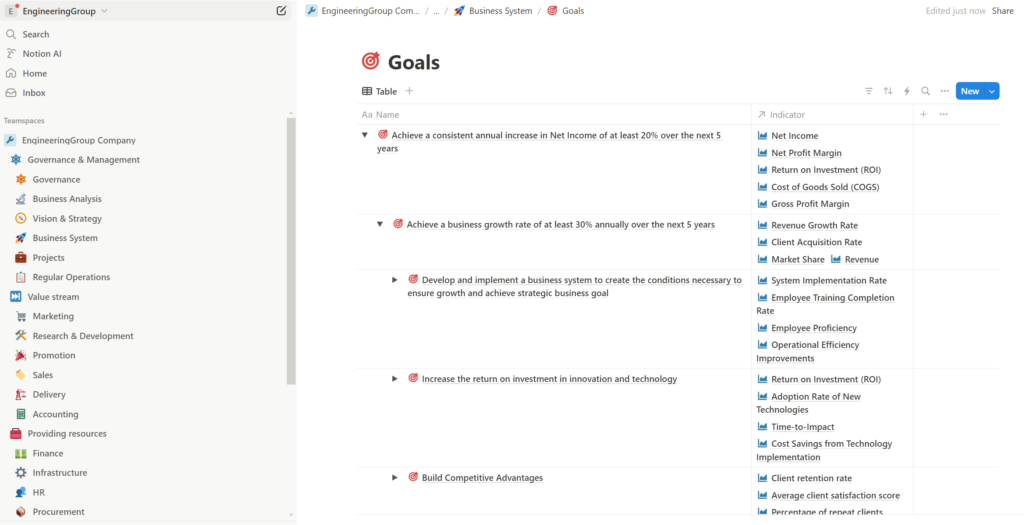
Relation between Goals and Indicators shows us how goals are measured and how we can monitor their achievement
Processes database table
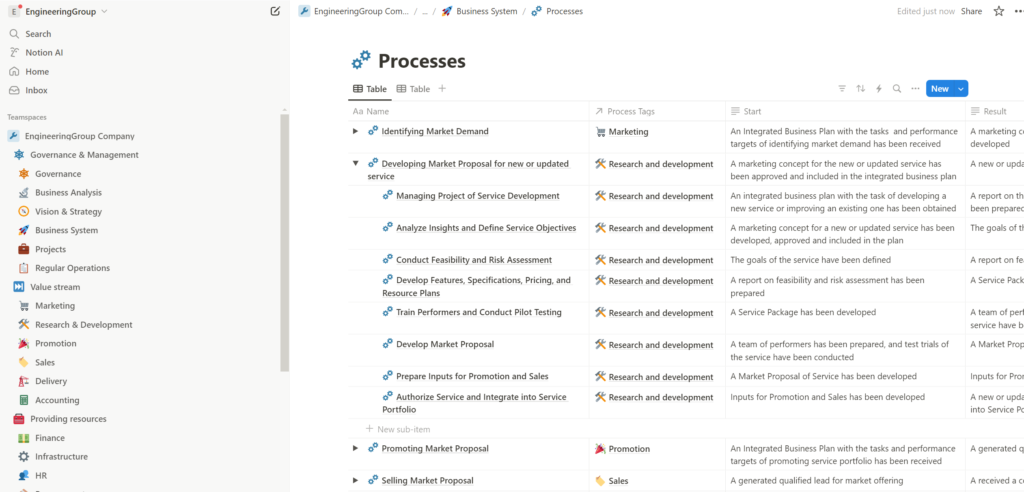
Using the “Processes” database table, along with Notion’s capabilities and the proposed methodology, provides a fundamental tool for process management. Built on the process model from the previous article, it allows us to:
- Structure our processes by adding sub processes.
- Define the initial event, outcome, and other key parameters for each process.
- Include visual materials such as flowcharts and business process diagrams.
- Prepare for process optimization and automation projects.
This approach helps identify bottlenecks in current operations that can be improved or optimized to enhance business efficiency. Additionally, it provides a deeper understanding of the scope of business optimization and automation efforts, preparing us for the next steps, including process automation.
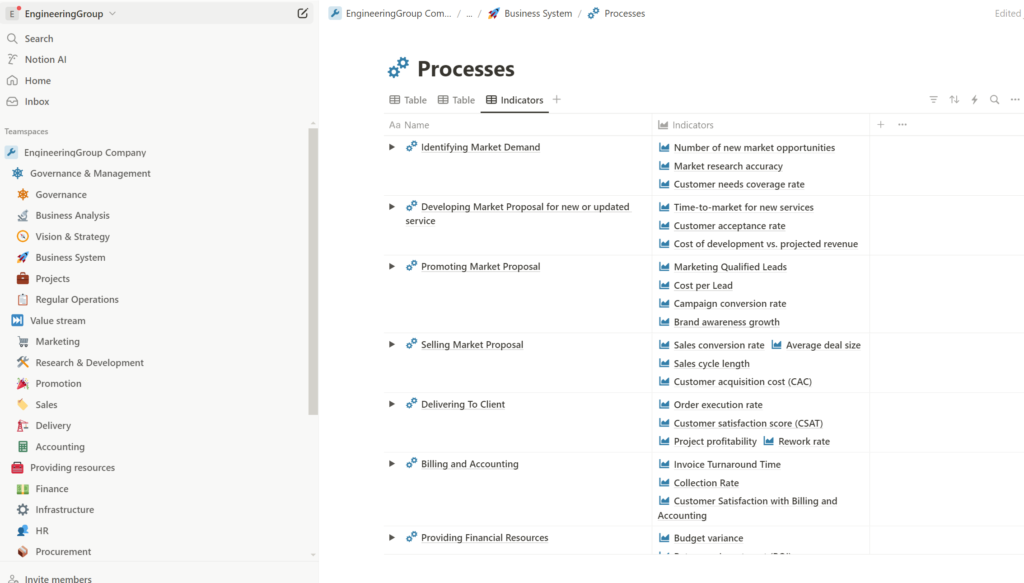
The relationship between Processes and Indicators shows where the indicators originate from and how we can monitor and measure their effectiveness.
Organization database table
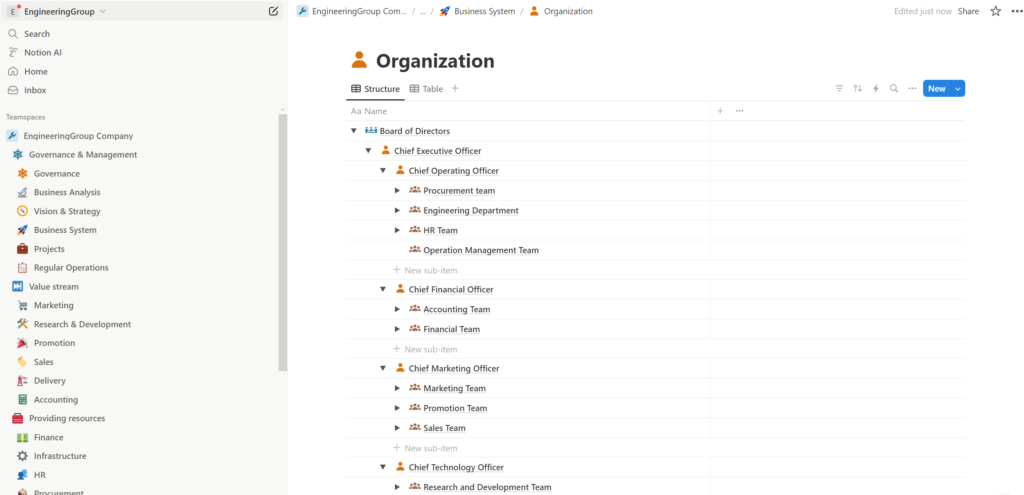
The ‘Organization’ database table helps us create our organizational or team structure by defining current positions along with their duties and responsibilities.
“Organization: Participation in Processes” database
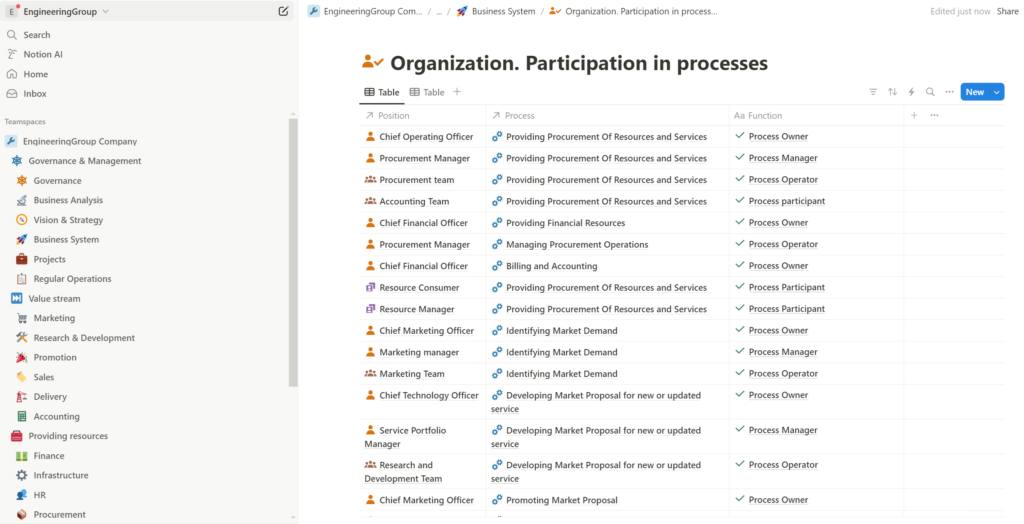
The ‘Organization: Participation in Processes’ database table is used to establish relationships between processes and the organizational structure. This relationship helps define who owns, manages, and performs process operations, providing a clear understanding of required human resources and enabling their more effective use.
Objects database table
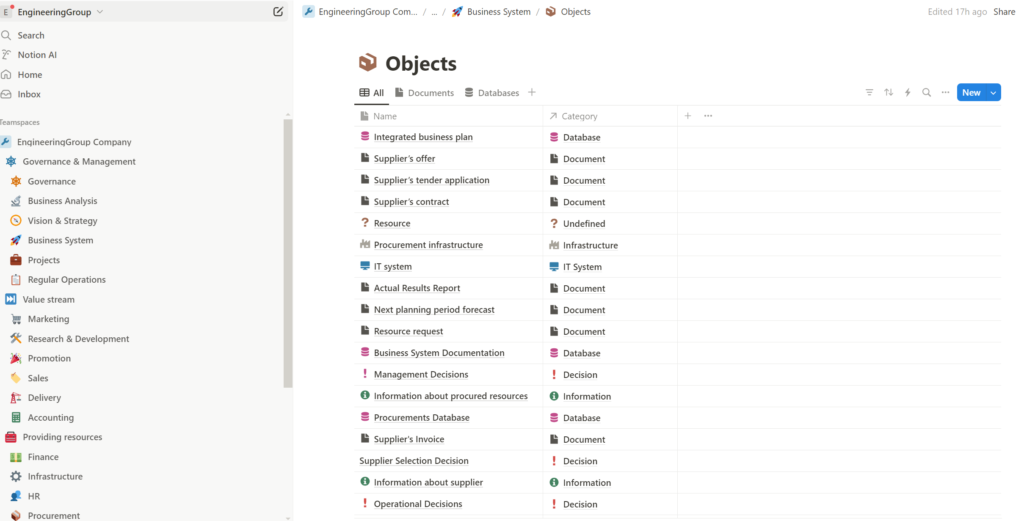
The “Objects” database table helps as to list all objects that using by business to understand for further optimization and automation too.
Objects. Usage in processes database table
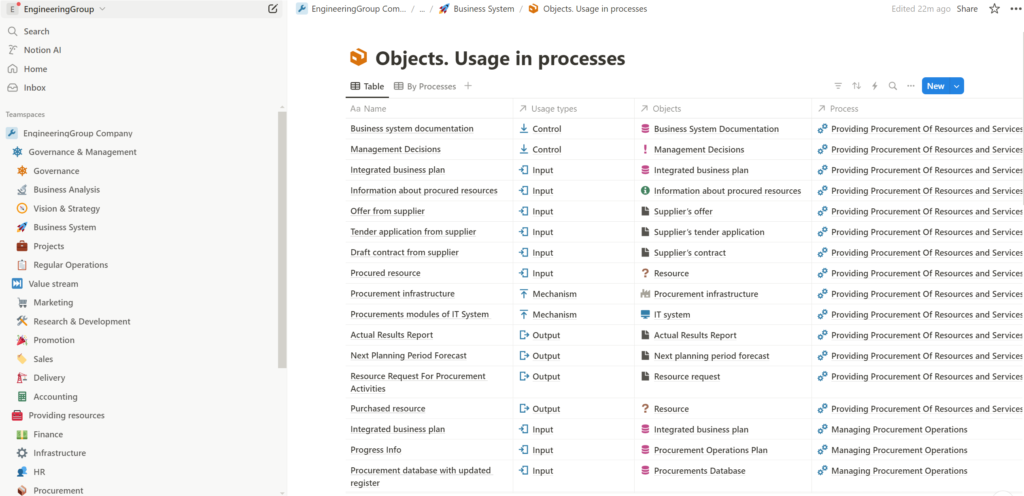
The ‘Objects. Usage in Processes’ database table is used to establish relationships between processes and objects. Objects serve as inputs, outputs, controls, and mechanisms within processes. This information enhances our understanding of process structures and their automation potential. It also helps identify objects that can be eliminated to reduce costs, as well as objects that should be introduced because they currently lack associated processes, even though such processes are necessary for the business system.
Finally, creating and populating the database of business system elements with accurate data provides us with a more precise and comprehensive view of the key components of the business system. This information can be effectively communicated to all stakeholders involved in the business. Proper use of the obtained tools will enable the business to avoid many mistakes and risks in the future, ultimately reducing costs for implementing business improvement projects.
Summary and conclusions
As a result of the work done, we have created a set of tools for structuring the key elements of the system. Filling them with accurate data ensures the outcome of systematization, while their further use enables solving a wide range of management tasks to achieve planned goals. Among these management tasks, for example, may be:
- Process optimization to reduce costs and increase productivity.
- Design and implementation of new processes that were previously missing, ensuring the business operates as a system rather than a collection of chaotic activities.
- Business process automation using existing market solutions or developing custom IT systems and applications to enhance competitiveness.
- Development and implementation of training and professional development programs for team members, enabled by a clearer understanding of goals, processes, and employee roles.
- Minimization of errors, poor decisions, and risks through a deeper and more visual understanding of how all processes should work, allowing for faster achievement of necessary results with lower costs.
In the future, it will only be necessary to update and supplement the database tables as internal and external conditions change and the business system evolves. This way, the business will always have an up-to-date and comprehensive knowledge base at hand, covering: where we are heading (goals), how we will achieve it (strategy), how everything operates (processes), who is responsible for what (organizational structure/team roles), what we measure to track results (indicators), and which objects are used or transformed in which processes, and so on.
However, it is also important to understand that not every business, at the start of its systematization and improvement efforts, has sufficient competencies and personnel to correctly formalize goals, indicators, processes, organizational structures, and objects—and to complete all this work properly within a single project. That is why, in the next article, I will explain how systematization processes should be structured so that this issue is fully addressed, allowing us to move forward.